API Testing Foundations # 1- What Is an API? A Practical Explanation for QA Engineers
14 October 2026
A tester is checking an order screen. The total shows ₹450, but it should be ₹540. She reports: “The UI shows the wrong amount.”
The developer opens the ticket, checks the UI code and finds nothing wrong. He sends it back. The tester sends it again. Two days later, someone opens the Network tab and finds that the API returned ₹450 all along. The bug was never in the UI.
Two days were lost because nobody checked what the screen was being told.
This is why QA engineers need to understand APIs. You don’t need to be a backend developer, but you do need to know what sits behind the screen.
What is an API, in plain language?
An API is a way for one piece of software to ask another piece of software to do something, following agreed rules.
Say a weather app wants today’s temperature for Hyderabad. It doesn’t have the data, so it sends a request to a weather service:
GET /weather?city=Hyderabad
The service replies with something like:
{ "city": "Hyderabad", "temp": 29, "unit": "C" }
That request and reply is the API at work. The “agreed rules” answer questions like:
Where do I send the request?
What format must it be in?
What will I get back?
What happens if I ask wrongly?
If the rules are broken, you get an error instead of data. An API is a contract: ask in this way, and you’ll get an answer in that way.
Every time an app shows live data, such as a bank balance, a cab’s location or a delivery status, an API call is happening behind the screen.
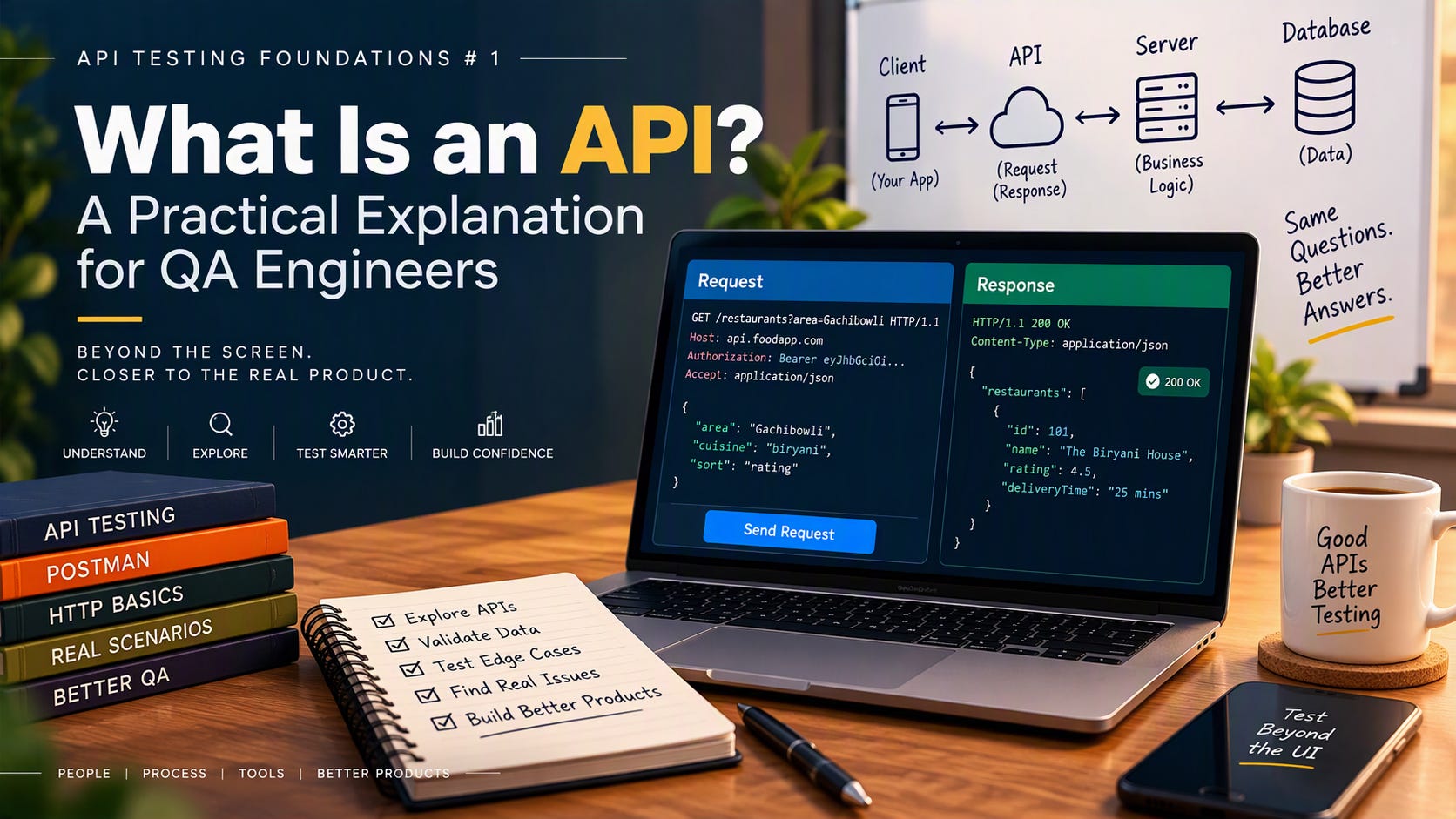
Client, server and API: a food-delivery example
Your phone isn’t the app. It’s just the part you see. Take a food-delivery app. Three pieces are involved:
Client: the app on your phone. It shows screens and collects your taps.
Server: the backend that holds restaurants, menus, orders and payments.
API: the set of requests the client is allowed to make to the server.
Here’s how one order might flow (endpoint names are illustrative):
You open the app. The client asks
GET /restaurants?area=Gachibowliand the server returns a list.You add items and tap Place Order. The client sends
POST /orderswith your items and address.The server checks the payment, saves the order and replies with an order ID and status.
The tracking screen keeps asking
GET /orders/{id}and updates as the status changes.
The client never touches the database directly. It only talks to the server through the API.
That tells a tester where to look:
What if the payment succeeds but the order isn’t created?
What if the user taps Place Order twice?
What if the restaurant closes between step 1 and step 2?
What if the network drops right after the request is sent?
None of these shows up on a happy-path screen. All of them live at the API layer.
What a request and response look like
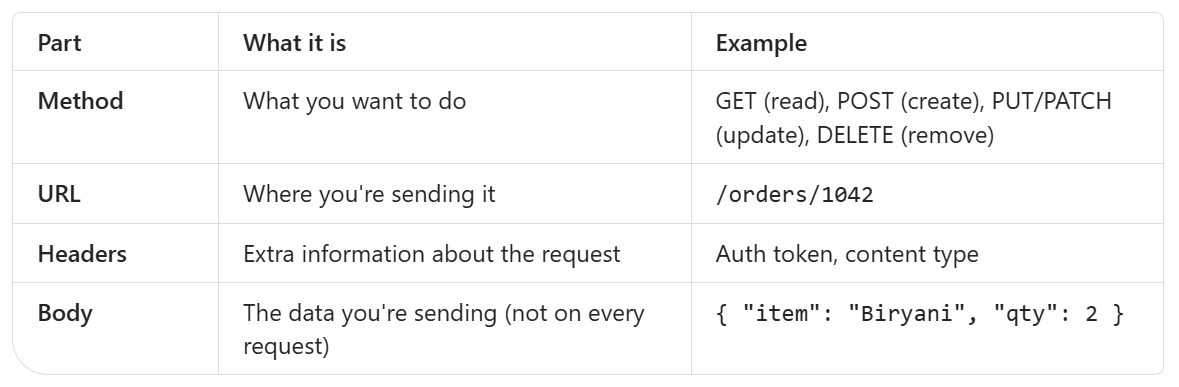
Every API call has the same basic parts.
The request:
The response:
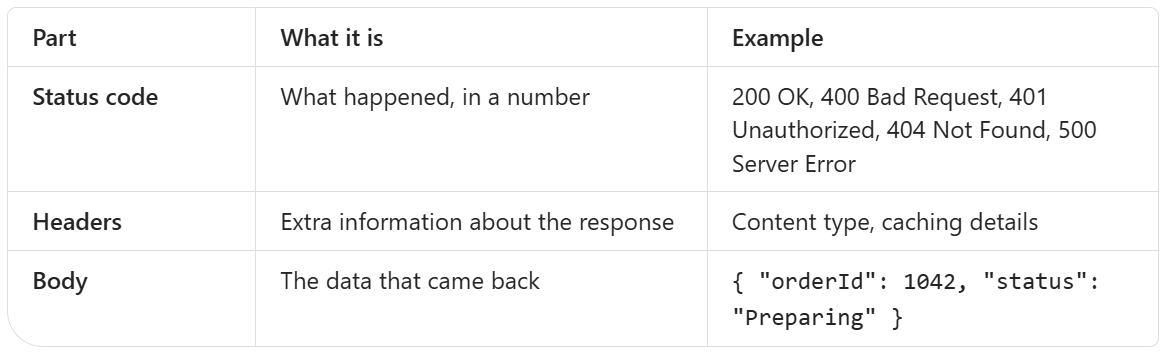
The status code is the fastest clue you have. As a rough guide, 2xx means success, 4xx means the request had a problem and 5xx means the server had a problem.
What happens between “Send” and the response
It’s more than “click, wait, result”. Roughly, this happens:
The client builds the request. Method, URL, headers and sometimes a body.
The address is resolved and a connection is made. The domain name is looked up and a secure connection is set up.
The request travels to the server, often through a gateway or load balancer that routes it.
The server checks who you are. Is the token valid? Are you allowed to do this?
The server does the work. It validates the input, applies business logic and reads or writes the database, sometimes calling other services.
The server builds the response. A status code, headers and usually a JSON body.
The client receives it and acts. It displays the data, or shows an error.
Each step is a place where something can break:
Step 2: DNS or certificate problems
Step 4: an expired token returning 401
Step 5: bad input returning 400, or a bug returning 500
Step 7: the response is right but the UI renders it wrongly
If you know which step failed, you know who to talk to.
UI testing vs API testing
The UI is one way of using the product. The API is where much of the product’s logic lives. When you test through the UI, you test what the screen allows. When you test the API, you test what the system accepts.
That shift changes a lot:
You see raw data. Status codes, headers and the full JSON, not just what the screen chose to show.
You can skip the screen. No browser and no clicking. API tests usually run faster and break less often than UI tests.
You can send what the UI never would. A form might limit a field to 10 characters. The API might accept 10,000 if nobody validated it server-side.
You can test earlier. You don’t need the UI to be built before you test the logic behind it.
You can test what the UI hides. Missing authentication, wrong permissions and broken error handling.
A key idea: UI validation is for the user’s convenience. Server-side validation is for safety. If the only check is in the UI, anyone with a tool like Postman can walk around it.
The UI still matters, because users experience the product through it. But if you only test through the UI, you only test the surface.
Scenario: the UI shows incorrect data
Back to the ₹450 vs ₹540 problem. Don’t guess. Follow the data backwards, one layer at a time.
Step 1: Check what the API returned. Open the browser’s Network tab and find the call behind that screen. Look at the raw response.
API shows ₹540, UI shows ₹450? The data is right and the display is wrong. Look at the UI: field mapping, formatting, caching or rendering logic.
API shows ₹450? The UI is faithfully showing what it received. Go deeper.
Step 2: Check the request. Was the UI sending the right parameters, such as the correct user ID, order ID or filters? A wrong request gets a “correct” answer to the wrong question.
Step 3: Check the database. Query the source of truth for that record.
DB shows ₹540, API returns ₹450? The bug is between them: the API’s logic, mapping or a calculation.
DB shows ₹450? The data was stored wrongly. Look at the write path: whatever created or updated that order, or a migration or another service.
Rule out the easy suspects too: cached responses, stale test data, and testing against a different environment than you think.

When you report it, don’t write “the UI shows wrong data.” Write where the data first went wrong, and attach the API response and the DB value. It saves the team hours of back and forth.
Try it in 10 minutes
You don’t need a special setup to start.
Open any website and press F12 to open DevTools.
Go to the Network tab and filter by Fetch/XHR.
Click around the page. Each entry is an API call.
Click one and look at the request (method, URL, headers) and the response (status, body).
Copy it into Postman or run it with
curl.Change something: remove a field, send an invalid value, drop the auth token. Watch what comes back.
Step 6 is where API testing really begins. Does the system reject bad input clearly, or does it behave in ways nobody planned?
What to look for when testing an API
Once you can send a request, these are good starting questions:
Correct data: does the response match what’s in the database and what the requirement says?
Status codes: does a bad request return 400, a missing record 404, a failed login 401, and not a generic 500?
Validation: what happens with empty, too long, wrong type or special-character values?
Authentication and authorisation: can someone without a token get in? Can user A see user B’s data?
Error messages: are they helpful without leaking internal details?
Repeated requests: what happens if the same POST is sent twice?
Performance: is the response time reasonable?
A quick prompt list: missing, wrong type, too big, duplicate, unauthorised, out of order.
The takeaway
An API is the layer where the client’s questions meet the server’s logic. Many of the bugs that users see on screen start there, and many bugs users never see are hiding there too.
If you remember one line from this article, make it this:
The UI tells you what the user sees. The API tells you what the system actually did.
Your turn: What was the first API you tested, and what surprised you? Reply or leave a comment. I’d like to hear it.
This is part of the API Testing Foundations series. Next: HTTP methods and status codes, and what each one tells a tester.
Share this article
Found this useful? Share it with another QA engineer.
Keep learning