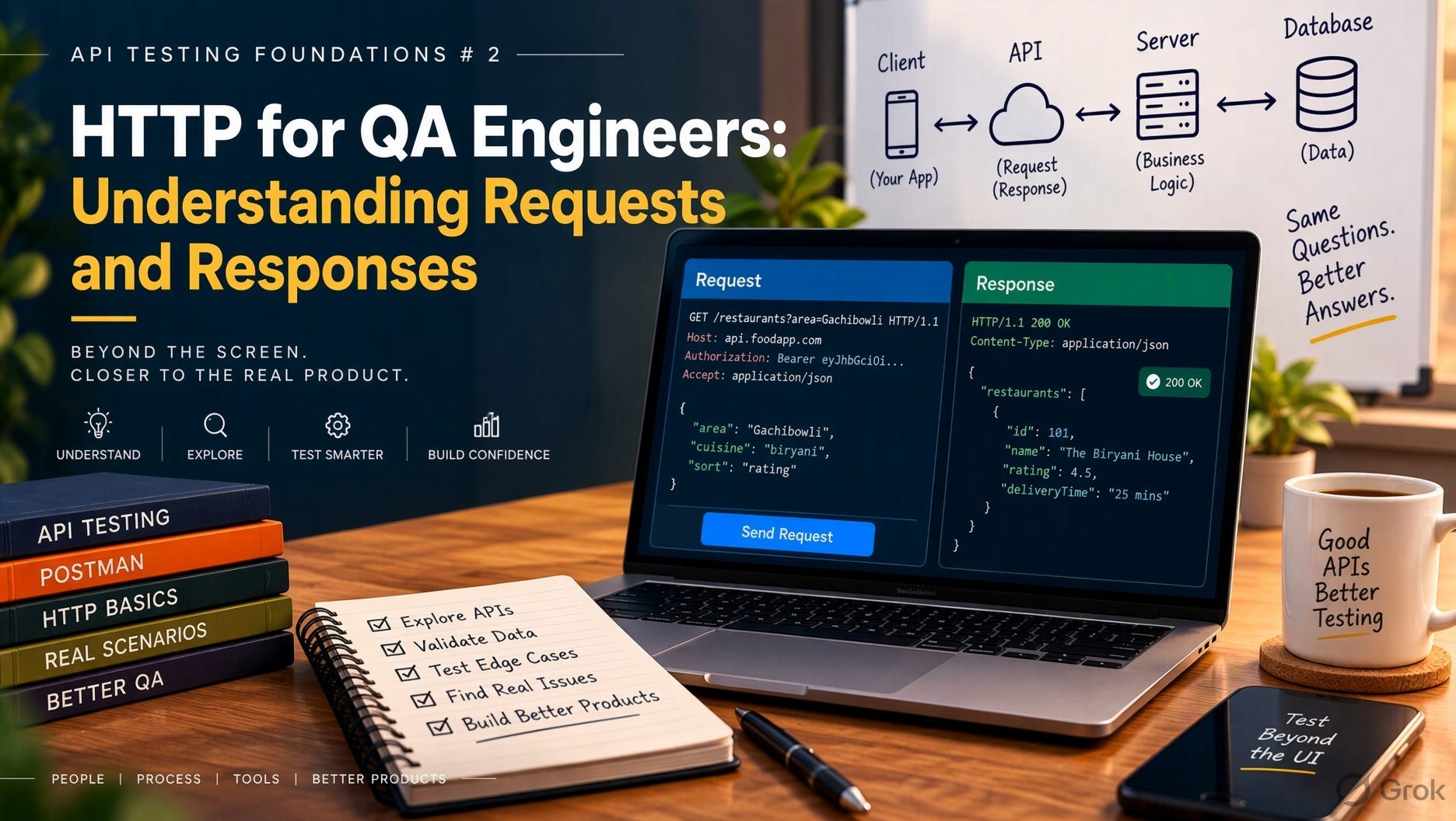
API Testing Foundations # 2 - HTTP for QA Engineers: Understanding Requests and Responses
21 October 2026
A bug report comes in: “Checkout fails sometimes.”
A tester who only works through the UI reproduces it, attaches a screenshot of a spinner, and assigns it to the frontend team. The frontend team says it’s a backend issue. The backend team says they can’t reproduce it. Three days later, it’s still open.
A tester who understands HTTP opens DevTools, reproduces it once, and finds the POST /api/orders call returning 504 Gateway Timeout after 30 seconds, but only when the cart has more than 20 items. The bug report now has a request, a response, a pattern, and an owner. It gets fixed that sprint.
Same bug, same tester skill level, very different result. The difference is knowing what’s happening underneath the screen.
This article isn’t a protocol textbook. It covers the parts of HTTP that change how you test and how you report bugs.
Why HTTP matters even if you “only do UI testing”
Every modern web and mobile app is a front end talking to APIs over HTTP. When you click a button, the UI is mostly packaging a request and displaying a response.
That means:
Most “UI bugs” aren’t UI bugs. The screen is just showing what the API returned.
The UI hides information. A generic “Something went wrong” toast might be a 400, a 401, a 409, or a 500. Each one means something completely different.
The UI can mislead you. A success message can appear even when the API failed, and a stale value can come from cache.
If you can read HTTP traffic, you stop guessing and start diagnosing.
The request: what the client asks for
An HTTP request has four parts: method, URL, headers, and body.
Method
The method states the intent.
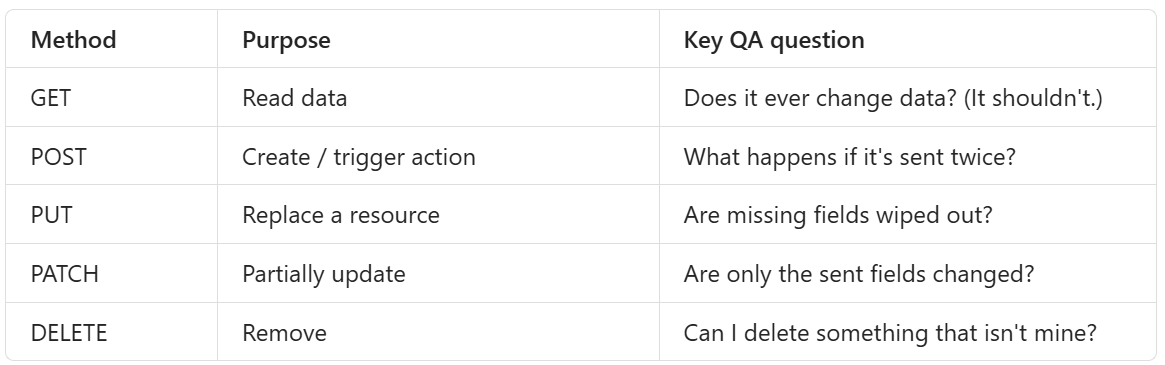
The POST row is where real money is lost. A user double-clicks “Pay,” or the network retries, and two identical POSTs hit the server. Does the customer get charged twice? This is idempotency, and testing it is a valuable check that’s easy to skip.
URL
https://shop.example.com/api/v1/orders/1042?include=items
Path (
/orders/1042) identifies the resource.Query params (
?include=items) filter or shape the result.
The most important test here is simple: change the ID. If logging in as User A and calling /orders/1043 returns User B’s order, you’ve found an Insecure Direct Object Reference (IDOR). It’s one of the most common serious API vulnerabilities, and finding it doesn’t take a security tool. Swapping a number is enough.
Headers
Headers carry context. The ones QA touches most:
Authorization: who you are (Bearer token, Basic auth)Content-Type: what format the body is inAccept: what format you want backCookie: session data from the browser
Negative tests that take very little time:
No
Authorizationheader → expect 401Valid token, but for a user without permission → expect 403
Expired token → expect 401, with a clear message
Wrong
Content-Type→ expect 415 or 400, not 500
Body
The body carries the payload, usually JSON. This is where input validation gets tested:
Required field missing
Wrong type (
"quantity": "five")Boundaries (
0,-1,99999999)Empty string vs
nullvs field absent (APIs often treat these three differently, and inconsistently)Extra fields the API doesn’t expect. Are they ignored, rejected, or, worse, saved? (
"role": "admin"on a profile update is the classic case.)
The response: what the server says back
A response has a status code, headers, and body. Most weak API tests read only the first.
Status codes: learn the ones that matter
You don’t need all of them. You need to know these well:
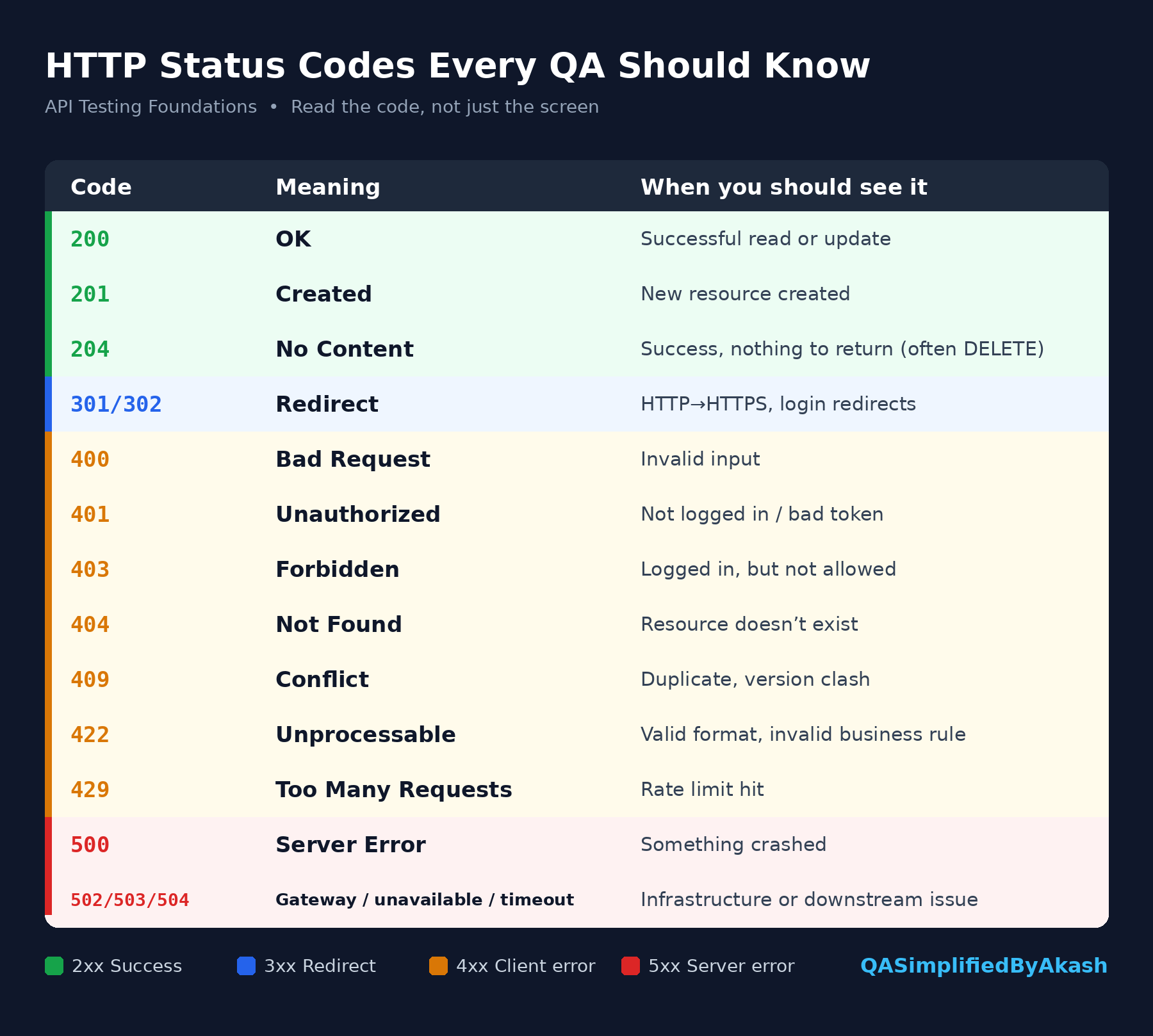
The rule to remember: a 500 caused by user input is always a bug. The server should have validated the input and returned a 4xx. A 500 means it didn’t, and that the input reached a part of the code that wasn’t expecting it.
Also watch for the opposite problem: APIs that return 200 for everything and put the error inside the body ({"success": false}). Monitoring, retries, and automation tools all depend on status codes. If the API returns 200 for a failure, all of those tools will treat it as a success.
Response headers
Check these, especially on auth and sensitive endpoints:
Content-Typematches what’s actually in the bodySet-Cookiefor sessions includesHttpOnly(JavaScript can’t read it) andSecure(HTTPS only)Cache-Control: no-storeon responses with personal or financial dataNo headers leaking server versions or internal details
Response body
This is where “status 200, test passed” falls apart. Check:
Schema: are the fields, types, and nesting what the contract promises?
Values: is the total correct? Is the status right? Is the timestamp in the right timezone?
Data exposure: does the user profile response include the password hash, internal IDs, or other users’ data?
Error quality: is the message useful to the client, without stack traces, SQL errors, or file paths?
HTTP is stateless, which is why sessions break
HTTP doesn’t remember anything between requests. Every request has to prove who it is, again and again. That’s what cookies and tokens are for.
This is the source of a whole family of bugs testers see regularly:
Logged out on page refresh
Logged in on one tab, logged out on another
Session survives logout (the token still works after the user clicks “Logout”)
Token never expires
Old token still works after a password change
Each of these can be tested directly at the HTTP level. For example, capture a token, log out, and replay a request with the old token. If it still works, logout is only cosmetic.
Your HTTP testing toolkit
You don’t need anything fancy to start:
Browser DevTools → Network tab: watch real traffic, filter by Fetch/XHR, inspect requests and responses, and use “Copy as cURL” to reproduce outside the UI.
cURL: the fastest way to replay and tweak a request.
Postman / Bruno / Insomnia: organize requests, add assertions, and build collections.
Code-based clients: REST Assured, Playwright’s
requestcontext, or Pythonrequestsfor automation.
A workflow that works well in practice:
Reproduce the bug in the browser with DevTools open.
Find the failing request.
Copy as cURL and replay it from the terminal.
Change one thing at a time (body, header, ID) until you isolate the cause.
Attach the request, response, and your finding to the bug.
That’s how “checkout fails sometimes” turns into “POST /orders times out when the cart has more than 20 items.”
Writing better bug reports with HTTP
Compare these two:
“Profile update not working. Screenshot attached.”
“PATCH /api/v1/users/me returns 500 when
phoneincludes a ‘+’ prefix. Same request without ‘+’ returns 200. Request/response attached. Expected: 200, or 400 with a validation message.”
The second one needs no back-and-forth. It names the endpoint, the trigger, the expected result, and the evidence. Developers fix these first because they can start immediately.
A practical HTTP checklist for every endpoint you test
Request side
Correct method accepted, wrong methods rejected (405)
Missing / invalid / expired auth handled (401/403)
Other users’ resource IDs blocked
Required, optional, extra, null, and empty fields handled
Boundary and type validation returns 4xx, never 5xx
Duplicate POSTs don’t create duplicate side effects
Response side
Status code is the correct one, not just a 2xx
Body matches the schema and the values are correct
No sensitive data in body or headers
Error messages are helpful and safe
Auth cookies have
HttpOnlyandSecureResponse time is acceptable
The takeaway
You don’t need to memorize RFCs to test APIs well. You need to see clearly what goes out and what comes back.
Once you read HTTP easily, three things change. Your bug reports get sharper. Your negative testing gets more thorough. And you stop treating the UI as the source of truth, because you know it’s only showing what the API returned.
Start this week: pick one feature you test daily, open the Network tab, and read every request it makes. You’ll likely find at least one thing you’ve never checked.
Next Wednesday: GET, POST, PUT, PATCH and DELETE with Real Testing Examples
Share this article
Found this useful? Share it with another QA engineer.
Keep learning