From Git Commit to Production: The Software Delivery Pipeline | DevOps Foundations #2
22 October 2026
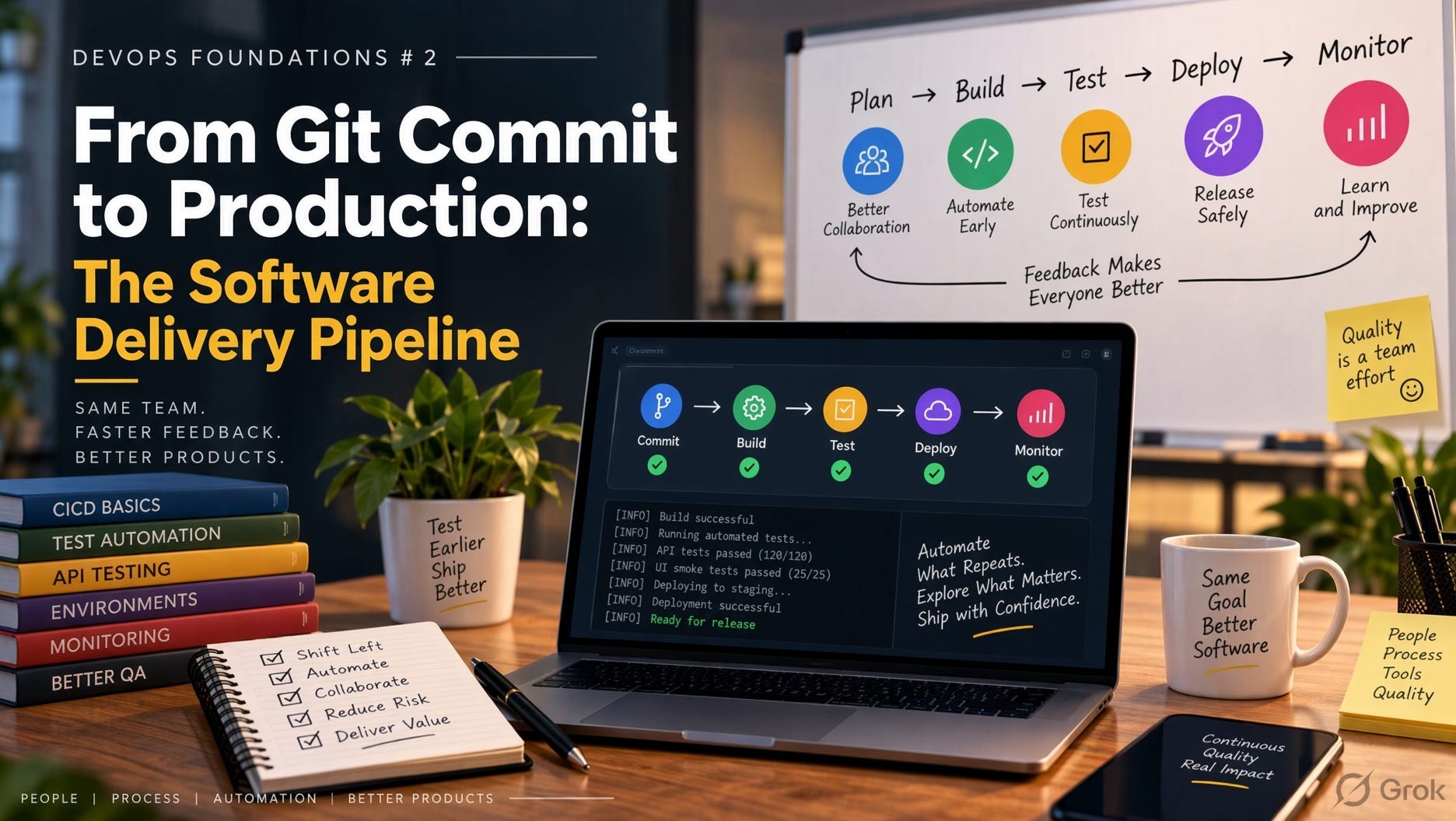
A pipeline diagram fits on a whiteboard: Commit → Build → Test → Package → Deploy.
The diagram leaves out most of what matters. Real pipelines fail on things like build caches, mutable tags, configuration drift, database migrations, secrets, and rollbacks that turn out not to work.
This article follows a change from commit to production one stage at a time. For each stage it covers what happens, why it exists, the design decisions involved and what commonly goes wrong.
1. The Mental Model: A Pipeline Is a Trust Funnel
A pipeline is not just automation. Each stage earns a bit more confidence that the change is safe, so the change can move closer to users.
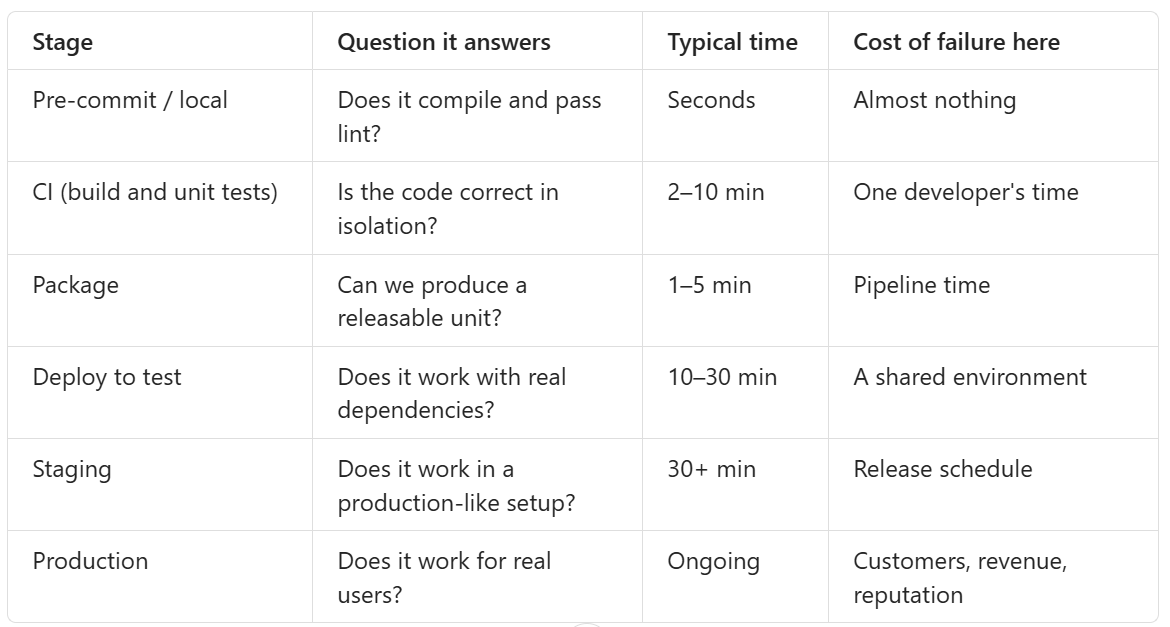
Three principles follow from this table:
Fail fast. Cheap checks run first, so expensive stages only see changes that have already passed them.
Increase realism as you go. Each environment should be closer to production than the one before it.
Promote, don’t rebuild. The object that earned trust is the object that ships.
Most pipeline problems come from breaking one of these three.
2. Stage 0: Before the Push
The pipeline starts on the developer’s laptop.
What happens:
Pre-commit hooks run formatting, linting and secret scanning (for example
pre-commit, Husky or gitleaks).The developer runs unit tests for the area they changed.
The commit is made on a short-lived branch.
Branching strategy decides how the pipeline behaves.
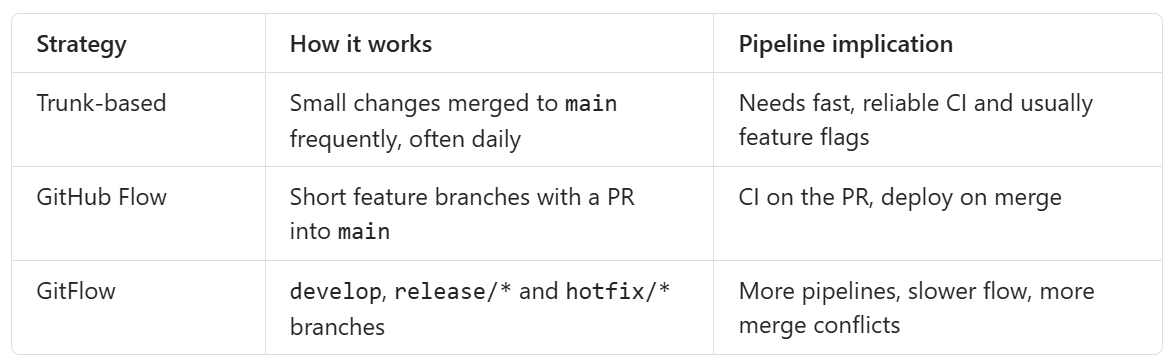
Long-lived branches are the hidden cost. A branch that lives for three weeks avoids CI in the sense that matters: it is never integrated with everyone else’s code until the end, when merging is at its most painful.
What goes wrong:
Secrets committed to Git. Once pushed, assume they are compromised and rotate them, because deleting them from history is not enough.
Hooks that are too slow get skipped with
--no-verify. Keep local checks under about 10 seconds.
3. Stage 1: The Trigger
A push fires a webhook from the Git host (GitHub, GitLab, Bitbucket or Azure Repos) to the CI system.
Triggers to know:
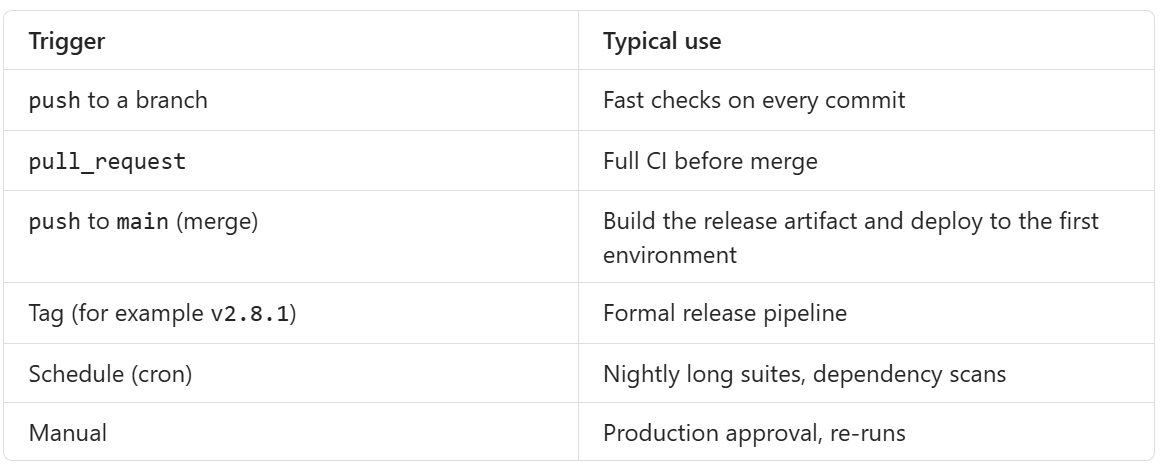
PR builds don’t test what you think. On GitHub, a PR build usually runs on a merge commit: your branch merged with the current target branch. That catches more than testing the branch alone. But if main moves after the build, the result goes stale. Two PRs can each pass and still break main once both are merged.
The fix is a merge queue (GitHub merge queue, GitLab merge trains). It tests each change against the exact state main will be in after merge, in order.
Path filters save time in monorepos: run the payments pipeline only when services/payments/** changes. They can also cause problems. If a shared library changes and the filters miss it, the services that depend on it never get tested.
4. Stage 2: Build
What happens:
A runner (a VM or container) starts and checks out the exact commit SHA.
Dependencies are resolved (Maven, npm, pip, Go modules).
Code is compiled or transpiled.
Static checks run: lint, type checks, static analysis (SonarQube, ESLint, Checkstyle).
Reproducible builds
The same commit should produce the same output every time. Three things undermine that:
Floating dependency ranges.
"lodash": "^4.17.0"can resolve to a different version next week. This is the1.4.2-a7f3c9vs1.4.2-b81e02bug from Note #8.Fix: commit lockfiles (
package-lock.json,poetry.lock,go.sum) and use strict install commands (npm ci, notnpm install).
Floating base images.
FROM node:20changes whenever upstream republishes it.Fix: pin by digest:
FROM node:20@sha256:....
Ambient runner state. The build works because a tool happens to be installed on one runner.
Fix: use ephemeral runners or build inside containers.
Caching
Caching is the biggest single speed improvement, and the most common source of “works on CI, fails on retry” problems.
Dependency cache: key it on the lockfile hash, for example
cache-key: deps-${{ hashFiles('package-lock.json') }}.Docker layer cache: order the Dockerfile so rarely changing layers come first.
# Good: dependencies cached until package files change
COPY package.json package-lock.json ./
RUN npm ci
COPY . .
RUN npm run build
# Bad: any source change invalidates the dependency layer
COPY . .
RUN npm ci && npm run buildCache poisoning: a corrupted or stale cache produces failures that disappear when the cache is cleared. If a failure goes away with a clean cache, your cache key is missing an input.
5. Stage 3: Test
“Test” in a pipeline is not one stage. It is a series of checks at different points.
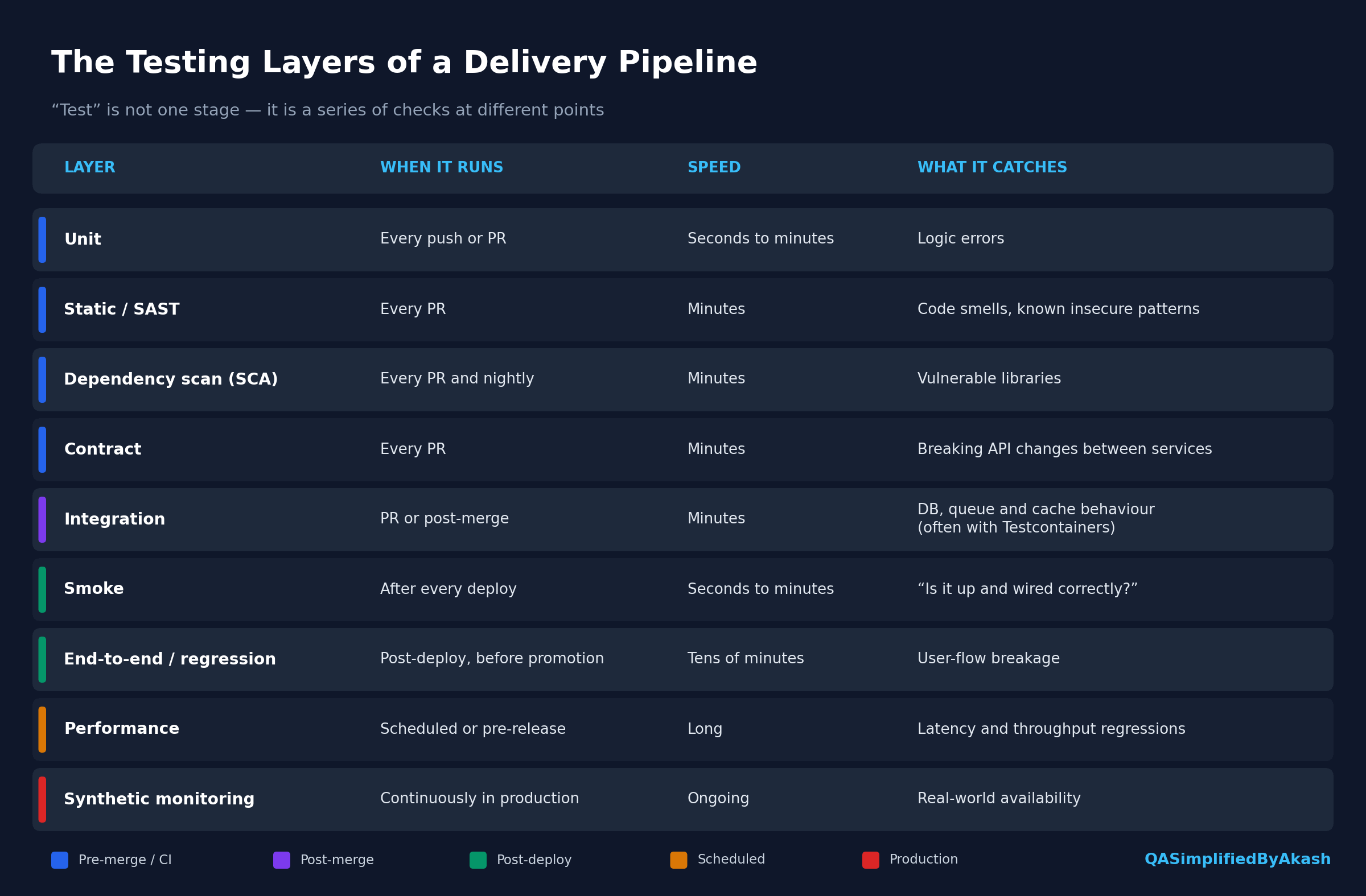
Design rules
Parallelize and shard. A 40-minute suite split across 8 runners takes about 5 minutes. Most CI tools support matrix or parallel jobs.
Quarantine flaky tests rather than retrying them silently. Automatic retries hide real race conditions. Track flaky tests, isolate them and fix them, or you’ll reach the Note #6 outcome where the team ignores red builds.
Required checks. In branch protection, only mark as required the checks you trust. A required check that is flaky trains people to re-run until it passes.
Publish results in a standard format (JUnit XML, Allure) so failures appear in the PR rather than buried in logs.
Coverage
Coverage gates (for example “new code must have 80% coverage”) prevent obvious gaps. They don’t prove correctness. Gate on coverage of new code, not overall coverage, or legacy code will block every PR.
6. Stage 4: Package
This is where code becomes an artifact: an immutable, versioned, deployable unit.
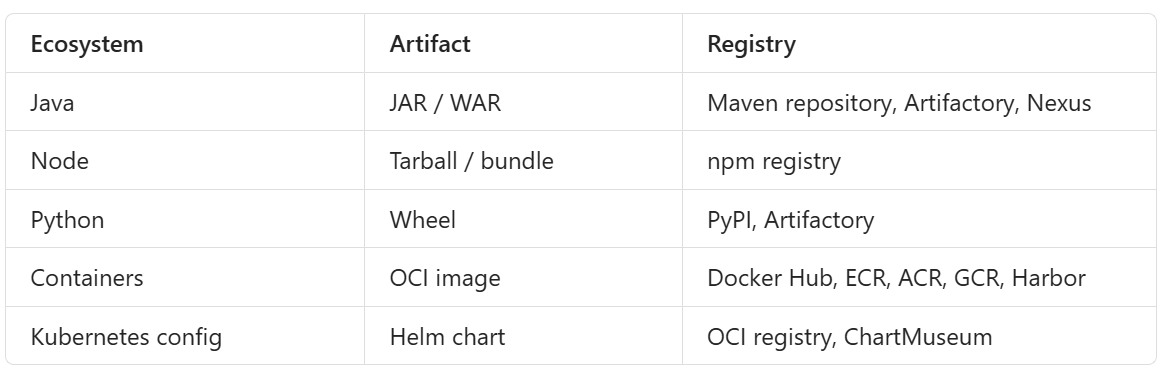
Versioning and tagging
Tags are labels, and labels can move. Digests can’t.
myapp:latest                      # moves constantly. Never deploy this.
myapp:2.8.1                       # human-readable, but can be overwritten
myapp:2.8.1-a7f3c9e               # version plus commit SHA, traceable
myapp@sha256:4f1c...              # content digest, immutable
Good practice:
Tag with semantic version plus Git SHA.
Deploy by digest, or make the registry reject tag overwrites (tag immutability in ECR, ACR and Artifactory).
Never deploy
latestto anything that matters.
Supply-chain metadata
Teams increasingly attach more than just the binary to an artifact:
SBOM (Software Bill of Materials): a list of everything inside the artifact, so you can answer “are we affected by this CVE?” in minutes.
Signature (for example Sigstore/cosign): proves the artifact came from your pipeline.
Provenance (the SLSA framework): records which commit, pipeline and builder produced it.
When a new vulnerability is announced, the team with SBOMs searches a database. The team without them opens every repository by hand.
Container image hygiene
Use multi-stage builds so compilers and dev dependencies don’t ship.
Use small base images (distroless, Alpine or slim variants) for a smaller attack surface and faster pulls.
Run as a non-root user.
Scan the image (Trivy, Grype) before pushing it.
7. Stage 5: Deploy
Deployment means taking the artifact and running it in an environment with that environment’s configuration.
Configuration is separate from the artifact
This comes from the https://12factor.net/config principle: anything that varies between environments lives outside the artifact.

If you need a different build for each environment, configuration has leaked into the build.
Secrets
Secrets don’t belong in Git, in images or in plain pipeline variables. Use a secret manager (HashiCorp Vault, AWS Secrets Manager, Azure Key Vault) and inject them at runtime. Where possible, use OIDC federation so the pipeline gets short-lived cloud credentials instead of storing long-lived keys.
Push vs pull deployments

With GitOps, “deploy” means a commit changing the image digest in a config repository. You get an audit trail, rollback becomes git revert, and the cluster doesn’t need to expose credentials to CI. The trade-off is another repository and another moving part to understand.
Deployment strategies
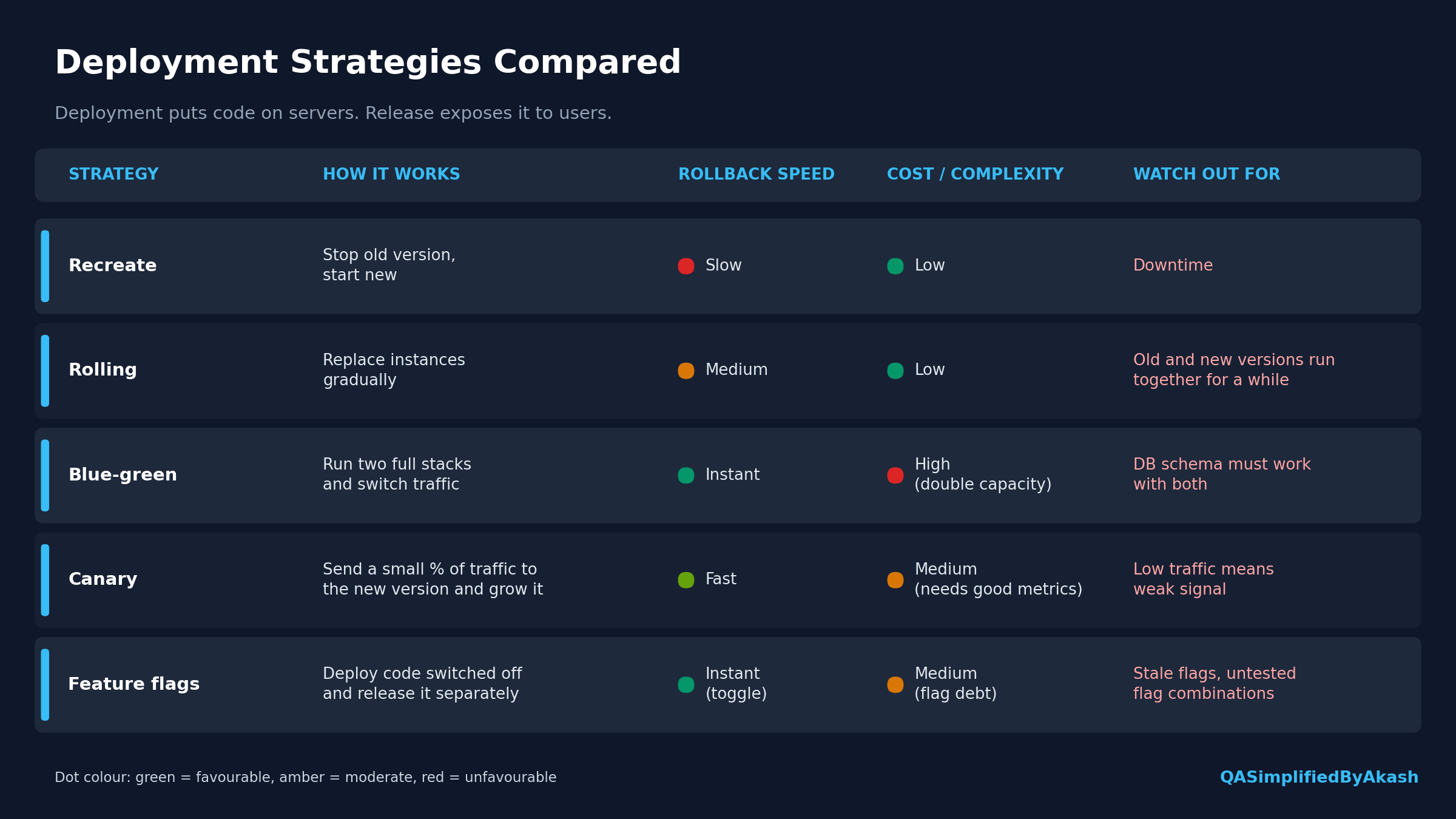
Deployment and release are different things. Deployment puts code on servers. Release exposes it to users. Feature flags and canaries let you separate the two, which is how high-performing teams deploy many times a day without users noticing.
Health checks decide whether a rollout continues
In Kubernetes:
Liveness probe: “is this process stuck?” If it fails, the container is restarted.
Readiness probe: “can this instance take traffic?” If it fails, the instance is removed from the load balancer.
A common bug is a readiness probe that just returns 200 without checking anything. The rollout proceeds, traffic arrives before the app has connected to its database, and users see errors while the deployment reports success.
8. Database Migrations
Code can be rolled back in seconds. A dropped column can’t.
During a rolling or blue-green deployment, old and new code run against the same database at the same time. So every schema change has to work with both versions.
The standard technique is expand → migrate → contract. Here it is for renaming username to login_id:
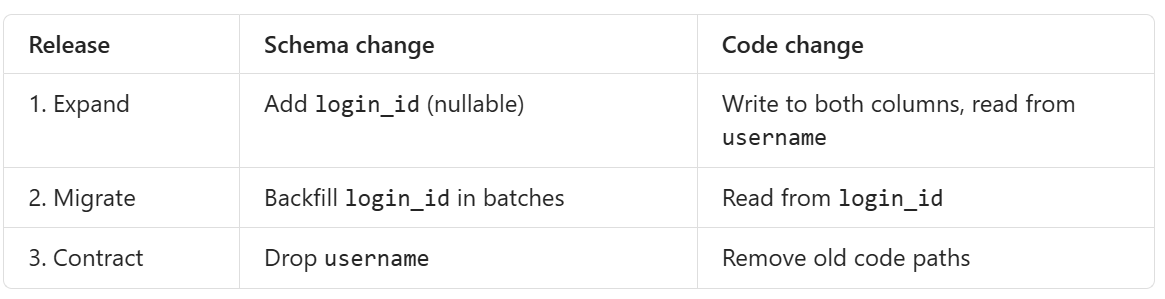
That’s three releases for one rename. Doing it in one release, where the old code expects a column the new migration just removed, is a classic cause of outages.
Rules:
Version migrations in the repo (Flyway, Liquibase, Alembic, Prisma migrate).
Run them as a separate, explicit pipeline step, not on app startup across multiple replicas at once.
Be careful with large-table migrations, which can lock tables. Backfill in batches.
Never make a destructive change in the same release that stops using the column.
9. Promotion Across Environments
The artifact moves through environments. It is never rebuilt along the way.
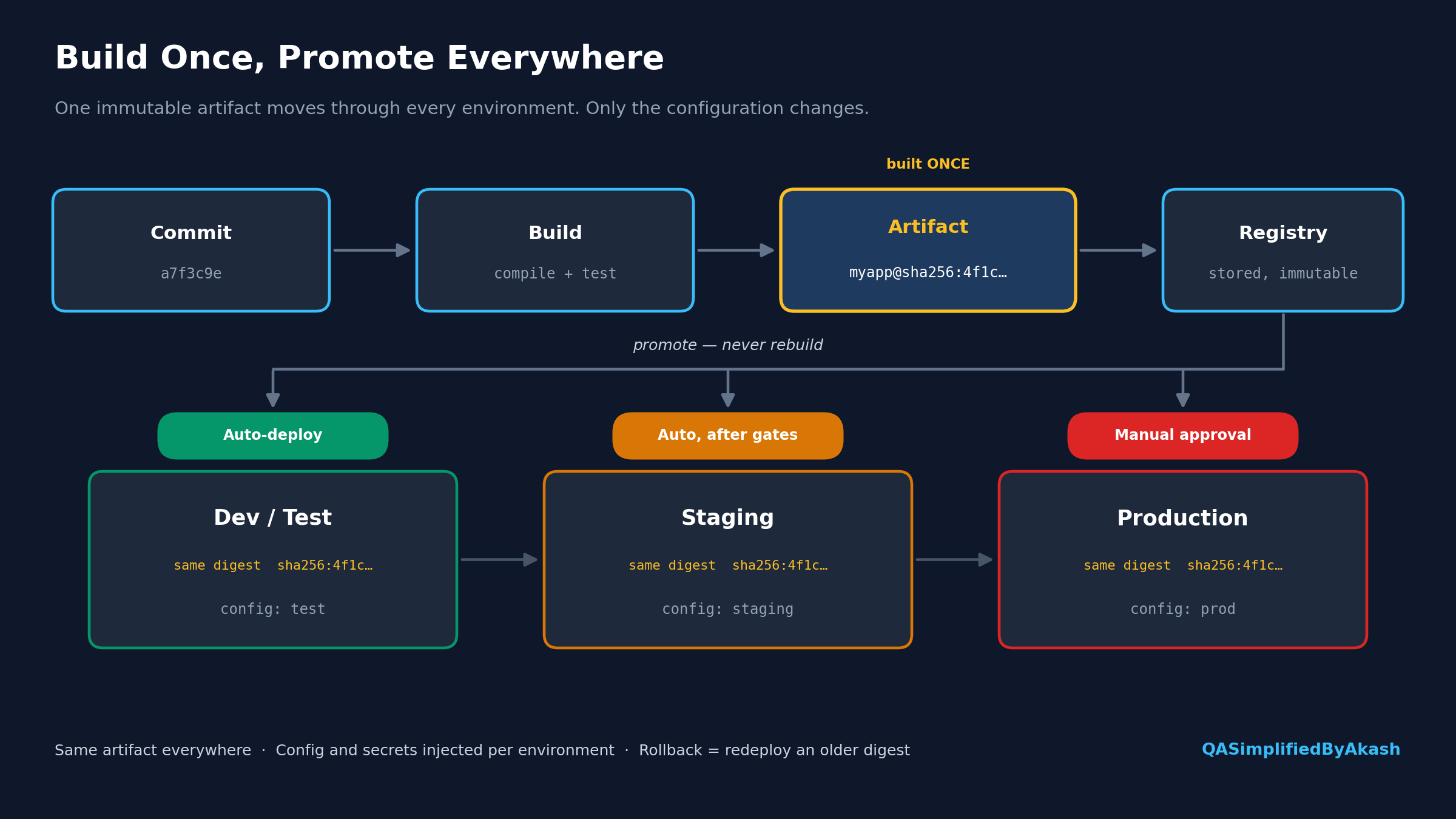
Gates between environments
Automated: all tests green, no critical vulnerabilities, error rate within budget.
Manual: an approval step in GitHub Environments, GitLab protected environments, Azure DevOps or Jenkins
input.Time-based: change freezes or deployment windows.
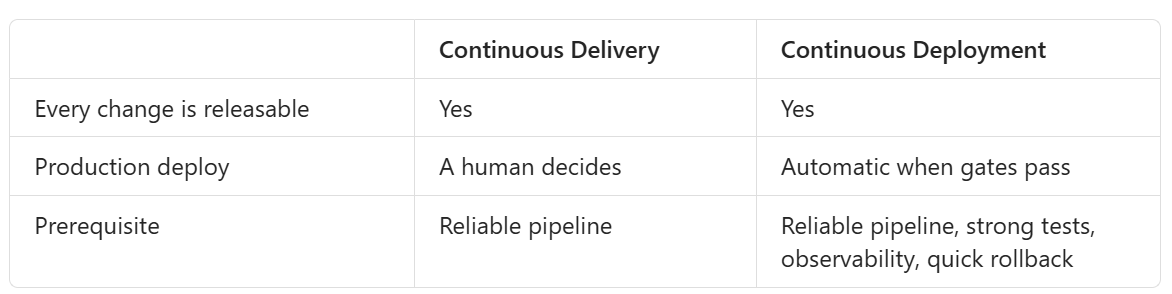
Continuous Delivery vs Continuous Deployment
Fighting environment drift (Note #9)
Infrastructure as Code (Terraform, Bicep, Pulumi) so environments are built from the same definitions.
Containers so the runtime is identical everywhere.
Config in version control so differences between environments are visible as diffs.
Parity where it matters: staging doesn’t need production’s scale, but it needs production’s topology. The Note #10 lockout bug existed because staging ran one instance with in-memory state, while production ran three instances sharing Redis.
10. After Deploy: Verifying Production
Deployment isn’t finished when the pipeline turns green. It’s finished when production confirms it.
Post-deploy verification:
Smoke tests against the production URL.
Synthetic checks on critical journeys (log in, search, pay).
Comparing the new version’s error rate and latency against the old version’s.
Automated rollback. Tools like Argo Rollouts and Flagger can analyse canary metrics and roll back without anyone intervening. This only works if you defined what “healthy” means beforehand, usually using SLOs.
The four golden signals (from Google’s SRE practice): latency, traffic, errors and saturation. If your dashboards don’t show these per version, you can’t tell whether the deploy caused a problem.
Rollback is a capability you need to practise. Ask your team:
Can we redeploy the previous artifact in under five minutes?
Is that artifact still in the registry, or did a retention policy delete it?
Is the schema still compatible with the old code?
Has anyone actually done it recently?
If the answer to the last question is no, you don’t really know whether rollback works.
11. Putting It Together: A Reference Pipeline
A simplified GitHub Actions example showing the principles above. Names and steps are illustrative.
name: delivery

on:
  pull_request:
  push:
    branches: [main]

jobs:
  ci:
    runs-on: ubuntu-latest
    steps:
      - uses: actions/checkout@v4
      - uses: actions/setup-node@v4
        with:
          node-version: 20
          cache: npm                # keyed on package-lock.json
      - run: npm ci                 # strict, reproducible install
      - run: npm run lint
      - run: npm test -- --ci       # unit tests, JUnit output
      - run: npm run test:contract

  package:
    if: github.ref == 'refs/heads/main'
    needs: ci
    runs-on: ubuntu-latest
    outputs:
      digest: ${{ steps.push.outputs.digest }}
    steps:
      - uses: actions/checkout@v4
      - name: Build and push image
        id: push
        uses: docker/build-push-action@v6
        with:
          push: true
          tags: registry.example.com/auth-svc:${{ github.sha }}
      - name: Scan image
        run: trivy image --exit-code 1 --severity CRITICAL registry.example.com/auth-svc:${{ github.sha }}

  deploy-staging:
    needs: package
    environment: staging
    runs-on: ubuntu-latest
    steps:
      - run: ./deploy.sh staging ${{ needs.package.outputs.digest }}
      - run: ./smoke.sh https://staging.example.com

  deploy-prod:
    needs: [package, deploy-staging]
    environment: production         # manual approval configured here
    runs-on: ubuntu-latest
    steps:
      - run: ./deploy.sh production ${{ needs.package.outputs.digest }}   # same digest
      - run: ./smoke.sh https://example.com
What to notice:
The image is built once, and both deploy jobs use the same digest.
PRs only run CI. Packaging and deployment happen only on
main.Production uses an environment with required reviewers.
Smoke tests run after every deployment, not just in CI.
12. Common Pipeline Failures and Their Root Causes
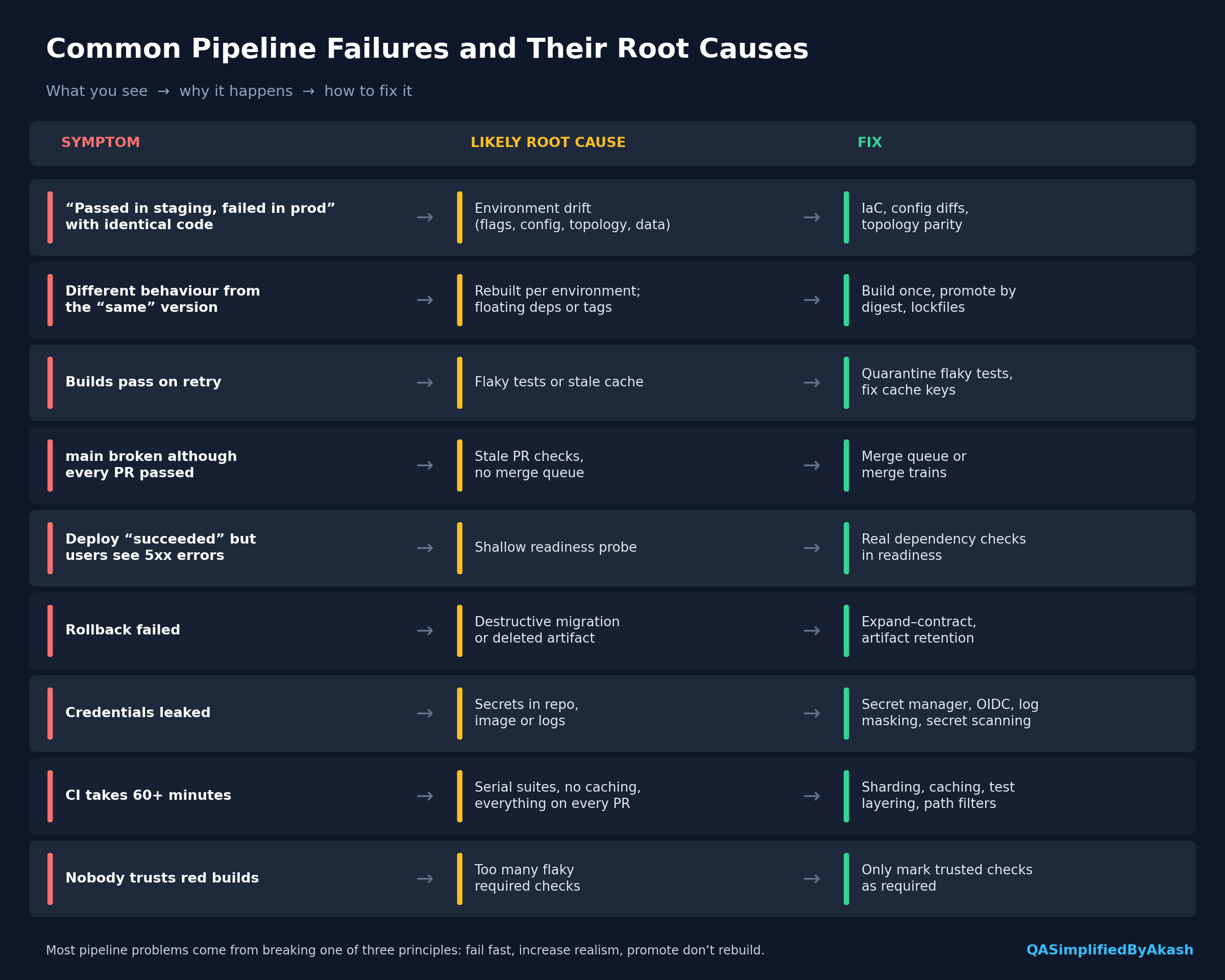
13. Measuring Your Pipeline: DORA Metrics
The DORA research programme uses four metrics to describe delivery performance:
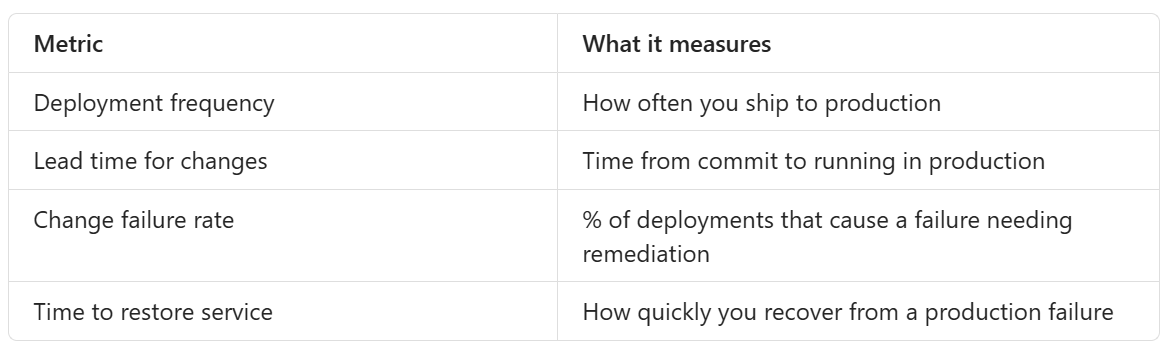
The key finding from that research is that speed and stability are not trade-offs. Teams with strong practices tend to do well on all four. Small batches, automated gates and fast rollback improve both.
Use these to compare your team with its own past, not to rank individuals.
14. The Lockout Bug Again, With Fixes
The Note #10 bug passed every gate and still broke production. Here’s how a well-designed pipeline would have caught or contained it:
Topology parity: staging runs multiple replicas with Redis, as production does.
Integration test with a real Redis (Testcontainers) covering multiple instances.
Canary release: 5% of traffic first, with lockout-rate metrics watched per version.
Feature flag on the new counter logic, so turning it off fixes the issue without redeploying.
Automated rollback triggered when the login failure rate goes above its SLO.
None of these is a testing tool on its own. Each is a pipeline design decision.
Key Takeaways
A pipeline is a trust funnel: fail fast, increase realism at each stage, promote rather than rebuild.
Reproducibility comes from lockfiles, pinned images and ephemeral runners.
Artifacts are immutable. Deploy by digest, not by
latest.Configuration and secrets live outside the artifact.
Deployment and release are separate. Canaries and feature flags exist to separate them.
Database changes must work with both the old and the new code. Use expand → migrate → contract.
A deploy isn’t done until production confirms it is healthy.
Rollback you haven’t practised probably won’t work.
Interview Questions on This Topic
Foundational
Walk me through what happens after a developer runs
git push.What’s the difference between continuous integration, continuous delivery and continuous deployment?
What is a build artifact? Why should it be immutable?
Why shouldn’t you deploy the
latesttag to production?What are dev, test, staging and production environments for?
Intermediate
Explain “build once, deploy many”. What breaks if you rebuild per environment?
How do you make builds reproducible?
A PR passed CI, but
mainbroke after merge. How could that happen, and how do you prevent it?Compare rolling, blue-green and canary deployments. When would you pick each?
What’s the difference between deployment and release?
How do you handle secrets in a CI/CD pipeline?
What’s the difference between liveness and readiness probes? What happens if readiness is implemented poorly?
Advanced / scenario-based
A change passed every stage and failed only in production. How do you investigate it?
How do you safely rename a database column during a zero-downtime deployment?
Your CI pipeline takes 55 minutes. How would you bring it under 15?
Builds randomly fail and pass on retry. How do you diagnose that?
Explain GitOps. How does it differ from push-based deployment?
What is an SBOM, and why does it matter when a new CVE is announced?
How would you design automated rollback for a canary deployment?
What are the DORA metrics, and how would you use them to improve a team’s pipeline?
What interviewers look for: most candidates can name the stages. Interviewers want reasoning behind them: why order matters, why artifacts are immutable, what fails in production and how pipeline design prevents it. A concrete story like the lockout bug or the rebuilt-artifact bug is usually more convincing than definitions.
Next in DevOps Foundations: Article #3: Continuous Integration from a QA Engineer’s Perspective
Follow QASimplified for practical engineering knowledge, interview preparation and career guidance.
Share this article
Found this useful? Share it with another QA engineer.
Keep learning