Interview Solved #6: Happiest Minds SDET Interview Decoded. What They Ask, What They Expect and How to Answer
19 October 2026

Experience category: 3–7 years (Automation Test Engineer / SDET / Senior QA)
These questions come from a candidate’s recent Happiest Minds SDET interview. They are not an official Happiest Minds question bank. Panels vary, so treat this as a pattern to prepare for, not a script to memorize.
Happiest Minds calls itself an AI-first digital engineering company, and Quality Engineering is one of its listed service lines. Its proprietary platforms include an Intelligent Quality Engineer (IQE) solution. Expect the panel to look past tool names and ask whether you’ve debugged real pipeline, parallel and data problems.
How to read the rounds:
Round 1 (Automation Core) mixes small coding problems with framework mechanics. Write the code out loud, and ask clarifying questions first.
Round 2 (QAOps and real-world scenarios) is where they separate script writers from framework owners. Every question there is something that breaks in CI.
With 3–7 years of experience, the expected answers include the trade-off, the failure mode and what you would do in a real team.
Happiest Minds | SDET | Interview Questions
📍 Round 1: Automation Core
Reverse words in “Happiest Minds 2026” without changing punctuation
Fix a stale element reference on dynamic React dropdown lists
How do you handle shadow root elements in Playwright vs Selenium?
Extract an auth token from an API response and pass it to a downstream header
How do you pass environment parameters into Jenkins pipeline builds?
Filter out empty or null strings from a list using Java 8 streams
How do you manage multi-tab window switching in headless Chrome?
📍 Round 2: QAOps and Real-World Scenarios
Bypass login screens using saved browser storage state
How do you manage 429 Too Many Requests rate limits in API tests?
Debug a test that passes on your local machine but fails on a Jenkins Docker node
Run parallel tests in TestNG using ThreadLocal without data leakage
Validate a JSON response structure against a dynamic schema file
A strategy to clean up test data created during parallel execution
Attach Playwright trace viewer artefacts to test reports on CI failure
How do you handle flaky web table pagination with dynamic polling?
Round 1: Automation Core
Q1. Reverse words in “Happiest Minds 2026” without changing punctuation.
What they’re really checking: Whether you ask a clarifying question before coding. “Reverse words” can mean two different things, and the example string has no punctuation in it, so the interviewer will probably change the input to something like "Hello, Happiest Minds 2026!".
Ask first: “Do you want the letters inside each word reversed, or the order of the words reversed? And should punctuation stay at its original position?”
Version A: reverse letters in each word, punctuation stays in place
static String reverseEachWord(String s) {
    char[] c = s.toCharArray();
    int i = 0;
    while (i < c.length) {
        if (!Character.isLetterOrDigit(c[i])) { i++; continue; }
        int j = i;
        while (j < c.length && Character.isLetterOrDigit(c[j])) j++;
        for (int l = i, r = j - 1; l < r; l++, r--) {   // reverse c[i..j-1]
            char t = c[l]; c[l] = c[r]; c[r] = t;
        }
        i = j;
    }
    return new String(c);
}
// "Hello, Happiest Minds 2026!" -> "olleH, tseippaH sdniM 6202!"
Version B: reverse word order, punctuation stays in place
static String reverseWordOrder(String s) {
    Pattern word = Pattern.compile("[A-Za-z0-9]+");
    List<String> words = new ArrayList<>();
    Matcher m = word.matcher(s);
    while (m.find()) words.add(m.group());
    Collections.reverse(words);
    Iterator<String> it = words.iterator();
    return word.matcher(s).replaceAll(r -> it.next());   // Java 9+
}
// "Hello, Happiest Minds 2026!" -> "2026, Minds Happiest Hello!"
Say this out loud:“Version A is O(n) time and modifies a char array in place. Version B tokenises the words, so punctuation and spacing stay exactly where they were.”
Where people go wrong:
Using
split(" ")and losing punctuation or double spaces.Treating
"Minds,"as a word, so the comma moves with it.Never asking which kind of reversal is wanted.
Expect the follow-up: “Do it without regex” or “handle Unicode letters.” Use Character.isLetterOrDigit, which already covers non-ASCII letters.
Q2. Fix a stale element reference on dynamic React dropdown lists.
What they’re really checking: Whether you know why the element goes stale. React re-renders the list, so the DOM node you stored no longer exists. Wrapping the click in a retry loop is not the fix.
A strong answer: Store locators, not elements, and look up the option again at the moment you click.
public void selectOption(String visibleText) {
    WebDriverWait wait = new WebDriverWait(driver, Duration.ofSeconds(10));
    wait.until(ExpectedConditions.elementToBeClickable(By.cssSelector("[data-testid='country-dropdown']")))
        .click();

    By option = By.xpath("//div[@role='option' and normalize-space()='" + visibleText + "']");
    wait.ignoring(StaleElementReferenceException.class)
        .until(ExpectedConditions.elementToBeClickable(option))
        .click();                                   // fresh lookup at click time

    wait.until(ExpectedConditions.textToBePresentInElementLocated(
        By.cssSelector("[data-testid='country-dropdown']"), visibleText));   // confirm selection
}
Key points:
Don’t collect
List<WebElement>and loop over it while the list is still filtering or loading.Wait for the list to stop changing before you read it, for example a loading spinner disappearing or the option count settling.
For type-ahead dropdowns, the list re-renders on every keystroke. Type the full text, wait, then locate the option.
Confirm the selection, because a click that lands on a node being replaced can do nothing.
Where people go wrong:
“I catch
StaleElementReferenceExceptionand retry 3 times.” That’s a bandage. Say what’s causing the re-render.Using
@CacheLookupon dropdown options.Using
Thread.sleep()to wait for React.
Expect the follow-up: “What’s the difference between stale and not-found?” A stale element was found, but its node was removed or replaced. A not-found element was never located.
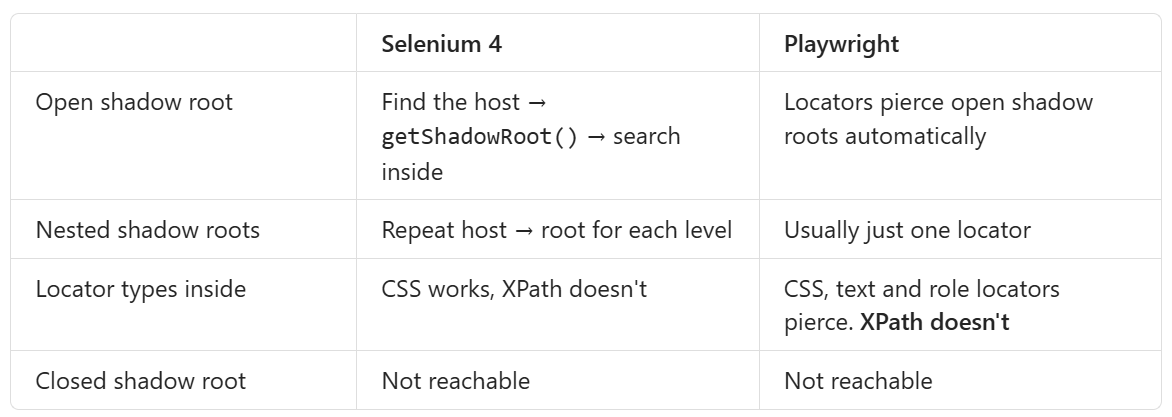
Q3. How do you handle shadow root elements in Playwright vs Selenium?
What they’re really checking: Whether you know Playwright pierces open shadow DOM by default and Selenium doesn’t.
A strong answer:
// Selenium
SearchContext root = driver.findElement(By.cssSelector("user-card")).getShadowRoot();
root.findElement(By.cssSelector("button.save")).click();
// Playwright: no explicit traversal needed for open roots
await page.locator('user-card button.save').click();
await page.getByRole('button', { name: 'Save' }).click();The point that sets you apart: “Playwright’s piercing makes tests shorter, but it can match elements in several components at once. I scope the locator to the host, so I don’t hit Playwright’s strict-mode violation.”
Where people go wrong:
Saying “Playwright can’t handle shadow DOM.”
Using XPath in either tool and blaming the framework.
Not knowing closed roots need a developer-provided test hook.
Expect the follow-up: “Your Selenium suite has a 3-level shadow DOM. How do you keep it maintainable?” Put the traversal in one helper or component object.
Q4. Extract an auth token from an API response and pass it to a downstream header.
What they’re really checking: Token chaining, plus where you keep the token and how you stop it leaking.
A strong answer (REST Assured):
public final class AuthClient {
    private static final ConcurrentHashMap<String, String> TOKENS = new ConcurrentHashMap<>();

    public static String token(String env) {
        return TOKENS.computeIfAbsent(env, e ->
            given().contentType(ContentType.JSON)
                   .body(Map.of("username", Config.user(e), "password", Config.password(e)))
            .when().post("/auth/login")
            .then().statusCode(200)
                   .extract().path("access_token"));
    }
}

RequestSpecification spec = new RequestSpecBuilder()
    .setBaseUri(Config.baseUrl())
    .addHeader("Authorization", "Bearer " + AuthClient.token(Config.env()))
    .build();

given().spec(spec).get("/accounts/ACC1001").then().statusCode(200);
Points to cover:
Extract with
extract().path()orjsonPath(), never with string parsing.Cache the token per environment or user. Don’t log in before every request.
Handle expiry. On a 401, refresh once and retry, or check the expiry claim before reusing.
Never log the token. Mask it in filters and reports.
Credentials come from CI secrets or a vault, not the repo.
Where people go wrong:
A static
String tokenshared across parallel users with different roles.Logging the full request, header included, at INFO level.
Hardcoding a token that expires mid-run.
Expect the follow-up: “How do you test the token itself?” Test expired, malformed and missing tokens, a wrong signature, and a token with insufficient scope.
Q5. How do you pass environment parameters into Jenkins pipeline builds?
What they’re really checking: The difference between parameters, environment variables and credentials, and how the value reaches your framework.
A strong answer:
pipeline {
  agent any
  parameters {
    choice(name: 'ENV', choices: ['qa', 'uat', 'staging'], description: 'Target environment')
    choice(name: 'BROWSER', choices: ['chrome', 'firefox'])
    string(name: 'TAGS', defaultValue: '@smoke')
    booleanParam(name: 'HEADLESS', defaultValue: true)
  }
  environment {
    REPORT_DIR = "reports/${params.ENV}"
  }
  stages {
    stage('Test') {
      steps {
        withCredentials([usernamePassword(credentialsId: "app-${params.ENV}",
                         usernameVariable: 'APP_USER', passwordVariable: 'APP_PASS')]) {
          sh """mvn -B test -Denv=${params.ENV} -Dbrowser=${params.BROWSER} \
                -Dheadless=${params.HEADLESS} -Dcucumber.filter.tags='${params.TAGS}'"""
        }
      }
    }
  }
}
And in the framework:
String env = System.getProperty("env", "qa");                  // -D value
String user = System.getenv("APP_USER");                        // injected credential
The layering to explain: “-D system property, then environment variable, then config file default. Secrets only come through withCredentials.”
Where people go wrong:
Putting passwords in
parametersor in the Jenkinsfile.Hardcoding the environment URL in the code.
Not knowing that parameters only appear in the UI after the first run of a pipeline that declares them.
Expect the follow-up: “How do you run the same pipeline nightly on QA and on demand on UAT?” A cron trigger with defaults, plus manual runs with parameters.
Q6. Filter out empty or null strings from a list using Java 8 streams.
What they’re really checking: Fluency, plus whether you get the order of the filters right.
A strong answer:
List<String> raw = Arrays.asList("login", null, "", "  ", "transfer", null, "logout");

// Java 8
List<String> clean = raw.stream()
    .filter(Objects::nonNull)              // must come first
    .map(String::trim)
    .filter(s -> !s.isEmpty())
    .collect(Collectors.toList());
// [login, transfer, logout]

// Java 11+
List<String> clean11 = raw.stream()
    .filter(Objects::nonNull)
    .filter(s -> !s.isBlank())
    .collect(Collectors.toList());
Say this out loud: “The null check must come first, or isEmpty() throws a NullPointerException. isBlank() is Java 11+, so on Java 8 I trim first.”
Automation use: cleaning text read from table cells or CSV test data before assertions.
Where people go wrong:
.filter(s -> !s.isEmpty() && s != null), which checks in the wrong order.Forgetting whitespace-only strings.
raw.removeIf(...)onArrays.asList, which throwsUnsupportedOperationExceptionbecause the list is fixed-size.
Expect the follow-up: “Also remove duplicates and sort case-insensitively.” Add .distinct().sorted(String.CASE_INSENSITIVE_ORDER).
Q7. How do you manage multi-tab window switching in headless Chrome?
What they’re really checking: Whether you know headless mode doesn’t change the window API, and what does change.
A strong answer: Window handling is the same in headless mode. Handles still form a Set, and you still have to wait for the new tab.
ChromeOptions opts = new ChromeOptions();
opts.addArguments("--headless=new", "--window-size=1920,1080");
WebDriver driver = new ChromeDriver(opts);

String parent = driver.getWindowHandle();
driver.findElement(By.linkText("Open statement")).click();

new WebDriverWait(driver, Duration.ofSeconds(10))
    .until(ExpectedConditions.numberOfWindowsToBe(2));

String child = driver.getWindowHandles().stream()
    .filter(h -> !h.equals(parent)).findFirst().orElseThrow();
driver.switchTo().window(child);
// ... assertions in the new tab ...
driver.close();
driver.switchTo().window(parent);

// Opening a tab yourself (Selenium 4)
driver.switchTo().newWindow(WindowType.TAB);
What actually differs in headless mode:
Window size. The default viewport can be small, which changes layouts and makes clicks land on other elements. Always set a size.
Downloads and pop-ups may behave differently, so check them explicitly.
You can’t watch it run, so log the tab title and URL after each switch, and take screenshots on failure.
Where people go wrong:
Assuming the second handle in the set is the new tab.
Not waiting for the tab to open.
Forgetting to switch back, so later steps run in a closed tab (
NoSuchWindowException).
Expect the follow-up: “With three tabs open, how do you pick one?” Loop over the handles and match on getTitle() or getCurrentUrl().
Round 2: QAOps and Real-World Scenarios
Q1. Bypass login screens using saved browser storage state.
What they’re really checking: Whether you know the mechanism and its limits.
A strong answer (Playwright): Log in once in a setup project, save the browser state to a file, and have every test start from it. Playwright recommends keeping that file in a git-ignored folder, because it contains live session cookies.
// auth.setup.ts
import { test as setup, expect } from '@playwright/test';
const authFile = 'playwright/.auth/user.json';

setup('authenticate', async ({ page }) => {
  await page.goto('/login');
  await page.getByLabel('Email').fill(process.env.APP_USER!);
  await page.getByLabel('Password').fill(process.env.APP_PASS!);
  await page.getByRole('button', { name: 'Sign in' }).click();
  await expect(page.getByRole('button', { name: 'Profile' })).toBeVisible();  // cookies are set
  await page.context().storageState({ path: authFile });
});
// playwright.config.ts
projects: [
{ name: 'setup', testMatch: /.*\.setup\.ts/ },
{ name: 'chromium', use: { storageState: 'playwright/.auth/user.json' }, dependencies: ['setup'] },
]The limits to mention:
One shared account only works if tests don’t change server-side state. If one test edits settings while another reads them in parallel, use separate accounts.
Where the app stores auth matters. Some apps, such as those using Firebase Auth, keep it in IndexedDB. That was a long-standing gap in
storageState. Check what your Playwright version saves before relying on it.Tokens expire. A long CI run can outlive the saved session.
Keep one real login test. Bypassing login everywhere means nothing checks the login screen itself.
In Selenium, the equivalent is logging in through the API and adding the session cookie with driver.manage().addCookie(...) before opening the page.
Expect the follow-up: “How do you test multiple roles?” Save one storage state file per role, such as admin and viewer.
Q2. How do you manage 429 Too Many Requests rate limits in API tests?
What they’re really checking: Two separate things. Avoiding 429s in a functional suite, and testing that rate limiting works.
A strong answer:
1. Avoiding 429s in the regression suite
Read the
Retry-Afterheader when it’s present, and wait that long.Otherwise, use exponential backoff with jitter and a retry cap.
Throttle parallel workers, or give each worker its own API key or user.
Ask for a higher rate limit for the test tenant, rather than slowing the whole suite.
Response callWithBackoff(Supplier<Response> call) {
    int attempts = 0;
    while (true) {
        Response r = call.get();
        if (r.statusCode() != 429 || ++attempts > 3) return r;
        String ra = r.getHeader("Retry-After");
        long waitMs = (ra != null) ? Long.parseLong(ra) * 1000
                                   : (long) (Math.pow(2, attempts) * 500 + ThreadLocalRandom.current().nextInt(250));
        sleepQuietly(waitMs);
        log.warn("429 received, retry {} after {} ms", attempts, waitMs);
    }
}(Retry-After can also be an HTTP date, so a production helper should handle both formats.)
2. Testing the rate limiter itself
Send requests just under the limit. All should pass.
Send requests just over it. Expect 429s with a sensible
Retry-After.Check that the window resets and that limits are per user or key, not global.
The point that sets you apart: “A 429 in a functional suite is test noise. A missing 429 in a rate-limit test is a defect. I keep those two concerns in separate suites.”
Where people go wrong:
Retrying forever with no cap.
Hiding 429s with retries, so nobody notices the suite is too aggressive.
Never testing that rate limiting exists.
Q3. Debug a test that passes locally but fails on a Jenkins Docker node.
What they’re really checking: A systematic diff of environments, not guesswork.
A strong answer: Start by capturing evidence: screenshots, page source, browser console logs, a trace or video, and full logs from the failing run. Then compare likely differences
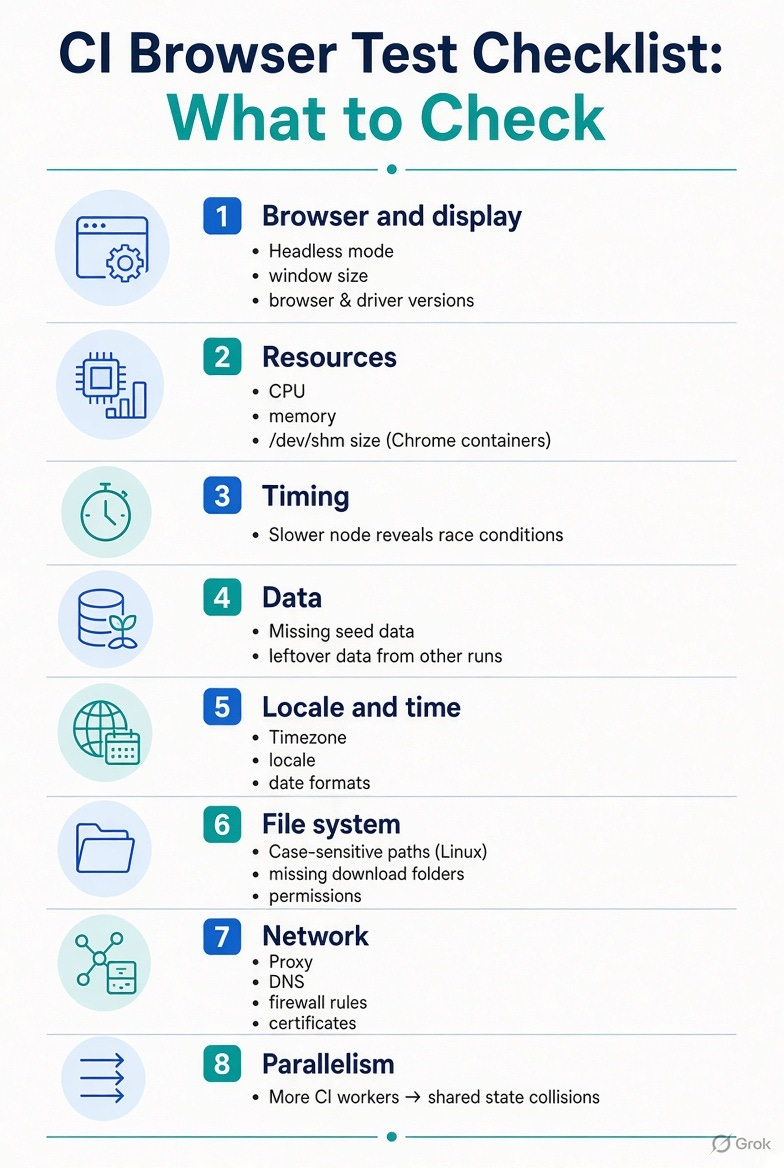
The fastest technique: run the same Docker image locally with the same command. If it fails locally too, you can debug it on your machine. If it doesn’t, the difference is in the node itself.
Where people go wrong:
Raising timeouts until it passes.
“It works on my machine,” and nothing further.
No artefacts kept from CI failures, so every investigation starts from scratch.
Q4. Run parallel tests in TestNG using ThreadLocal without data leakage.
What they’re really checking: The cleanup step most people forget, and state other than the driver.
A strong answer:
public final class DriverManager {
    private static final ThreadLocal<WebDriver> DRIVER = new ThreadLocal<>();
    public static void set(WebDriver d) { DRIVER.set(d); }
    public static WebDriver get() { return DRIVER.get(); }
    public static void unload() {
        WebDriver d = DRIVER.get();
        if (d != null) d.quit();
        DRIVER.remove();                       // critical in thread pools
    }
}

public class BaseTest {
    @BeforeMethod(alwaysRun = true)
    public void setUp() { DriverManager.set(DriverFactory.create(Config.browser())); }

    @AfterMethod(alwaysRun = true)
    public void tearDown() { DriverManager.unload(); }
}
<suite name="regression" parallel="methods" thread-count="4">Why remove() matters: TestNG reuses threads. Without remove(), the next test on that thread can pick up the previous test’s quit driver, which gives NoSuchSessionException, or its leftover data.
Other leak points to cover:
Static mutable fields in page objects or utilities.
Shared test data, so two threads edit the same account. Generate unique data per test.
Reports and logs. Use thread-safe reporters, and tag log lines with the test name.
Page objects must get the driver from
DriverManager.get(), not from a static field.
Expect the follow-up: “parallel="methods" vs "classes"?” With methods, every test method can run on its own thread. With classes, each class stays on one thread, which is safer if a class shares state between its methods.
Q5. Validate a JSON response structure against a dynamic schema file.
What they’re really checking: Schema validation, plus what “dynamic” means in your framework.
A strong answer: “Dynamic” usually means one of two things. Either the schema is chosen at runtime (by endpoint, API version or response type), or the response has variable shapes that the schema has to allow.
// Choose the schema at runtime
String schemaPath = String.format("schemas/%s/%s.json", Config.apiVersion(), "account");

given().spec(spec).get("/accounts/ACC1001")
.then().statusCode(200)
       .body(JsonSchemaValidator.matchesJsonSchemaInClasspath(schemaPath));
Inside the schema, handle variation explicitly:
{
  "type": "object",
  "required": ["accountNo", "status", "balance"],
  "properties": {
    "accountNo": { "type": "string", "pattern": "^ACC[0-9]+$" },
    "status":    { "enum": ["ACTIVE", "DORMANT", "CLOSED"] },
    "balance":   { "type": "number", "minimum": 0 },
    "closedOn":  { "type": ["string", "null"], "format": "date" }
  },
  "additionalProperties": false
}
Points to cover:
requiredcatches missing fields.additionalPropertiesdecides whether unexpected fields fail the test, so agree that decision with the team.Use
oneOforanyOffor responses that come in more than one shape.Keep schemas versioned in Git alongside the API contract.
Schema checks prove the structure. You still need value assertions for business rules.
Where people go wrong:
Treating a schema pass as a full test.
Generating a schema from one sample response, so every field is “required” and every value fits an over-specific type.
Schemas that drift from the real contract, because nobody owns them.
Q6. A strategy to clean up test data created during parallel execution.
What they’re really checking: That cleanup is owned, scoped and safe, and never deletes another thread’s data.
A strong answer: Use layers:
Make data traceable. Every record gets a run ID and thread ID prefix, for example
AUTO_RUN1234_T3_user.Register what you create. Track created IDs per test in a
ThreadLocal<List<String>>.Delete per test in teardown, through the API, in reverse order of creation (children before parents).
Make deletes safe to repeat. Treat “already gone” (404) as a success.
Run a sweeper job after the suite, or nightly, that deletes anything with the
AUTO_prefix older than a set age. That catches data left by crashed runs.
private static final ThreadLocal<Deque<Runnable>> CLEANUP = ThreadLocal.withInitial(ArrayDeque::new);

public static String createAccount() {
    String id = accountApi.create("AUTO_" + RUN_ID + "_" + Thread.currentThread().getId());
    CLEANUP.get().push(() -> accountApi.deleteIgnoringNotFound(id));   // LIFO
    return id;
}

@AfterMethod(alwaysRun = true)
public void cleanUp() {
    Deque<Runnable> tasks = CLEANUP.get();
    while (!tasks.isEmpty()) {
        try { tasks.pop().run(); } catch (Exception e) { log.warn("Cleanup failed", e); }
    }
    CLEANUP.remove();
}
The point that sets you apart: “The best cleanup is cleanup you don’t need: an ephemeral environment or database per pipeline run, thrown away afterwards. When that isn’t possible, I use prefixes, per-test registration and a sweeper.”
Where people go wrong:
DELETE FROM users WHERE name LIKE 'test%'in the middle of a parallel run.Cleanup that fails the test, which hides the real result.
Relying only on
@AfterSuite, which won’t run if the JVM crashes.
Q7. Attach Playwright trace viewer artefacts to test reports on CI failure.
What they’re really checking: Whether you make CI failures debuggable without rerunning.
A strong answer:
// playwright.config.ts
export default defineConfig({
  retries: process.env.CI ? 1 : 0,
  reporter: [['html', { open: 'never' }], ['junit', { outputFile: 'results/junit.xml' }]],
  use: {
    trace: 'retain-on-failure',        // or 'on-first-retry' to save space
    screenshot: 'only-on-failure',
    video: 'retain-on-failure',
  },
});
The HTML report links each failed test to its trace. Then make sure CI keeps the files:
post {
  always {
    archiveArtifacts artifacts: 'playwright-report/**, test-results/**', allowEmptyArchive: true
    junit 'results/junit.xml'
  }
}
(In GitHub Actions, the equivalent is an upload-artifact step with if: always().)
Then open the trace with npx playwright show-trace trace.zip. It shows each action with DOM snapshots, network calls and console output.
Points to cover:
retain-on-failurevson-first-retry. The first records every test but keeps only failures. The second records only when a test is retried, which costs less.Traces can contain tokens and personal data. Limit who can access the artefacts, and set a retention period.
For Playwright Java, call
context.tracing().start(...)andstop(new Tracing.StopOptions().setPath(...))in your hooks, then attach the file to Allure or Extent.
Where people go wrong:
trace: 'on'for everything, which fills up storage.Archiving only when the build succeeds, so failed runs leave nothing behind.
Not knowing the trace viewer exists.
Q8. How do you handle flaky web table pagination with dynamic polling?
What they’re really checking: Whether you wait for the page to actually change, not for a fixed time.
Why it’s flaky: After you click “Next”, the old rows stay on screen until the new data arrives. If you read the table too early, you read page 1 twice.
A strong answer (Selenium): Capture something from the current page, click, then wait until it changes.
public List<String> readAllPages() {
    List<String> all = new ArrayList<>();
    WebDriverWait wait = new WebDriverWait(driver, Duration.ofSeconds(10));
    int guard = 0;

    while (true) {
        all.addAll(readCurrentRows());
        WebElement next = driver.findElement(By.cssSelector("[data-testid='next-page']"));
        if (!next.isEnabled() || ++guard > 100) break;          // last page or safety cap

        WebElement firstRow = driver.findElement(By.cssSelector("table tbody tr"));
        String pageLabel = driver.findElement(By.cssSelector("[data-testid='page-indicator']")).getText();
        next.click();

        wait.until(ExpectedConditions.stalenessOf(firstRow));   // old rows replaced
        wait.until(d -> !d.findElement(By.cssSelector("[data-testid='page-indicator']"))
                          .getText().equals(pageLabel));        // indicator moved on
    }
    return all;
}
Playwright version:
const indicator = page.getByTestId('page-indicator');
const before = await indicator.textContent();
await Promise.all([
  page.waitForResponse(r => r.url().includes('/api/orders?page=') && r.ok()),
  page.getByTestId('next-page').click(),
]);
await expect(indicator).not.toHaveText(before!);      // auto-retrying assertion
Better signals, from strongest to weakest:
The network response for the next page.
A page indicator or row content changing.
Staleness of an old row.
A loading spinner appearing and then disappearing.
The point that sets you apart: “If I only need to check data across pages, I query the API behind the table and keep one UI test for the pagination controls themselves.”
Where people go wrong:
Thread.sleep(2000)after every click.No safety cap, so a broken “Next” button loops forever.
Comparing row counts, which can be equal on two different pages.
Quick revision sheet (read this the night before)
String reversal: ask which kind first. Reverse letters in place with two pointers, or reverse word order with regex tokens.
Stale elements in React: store locators, not elements. Look up again at click time, and confirm the selection.
Shadow DOM: Selenium needs
getShadowRoot()at each level. Playwright pierces open roots. XPath fails in both, and closed roots can’t be reached.Token chaining:
extract().path(), cache per environment or user, refresh on 401, never log the token.Jenkins parameters:
parameters{}→params.X→-Dkey=value→System.getProperty. Secrets come throughwithCredentials.Null or empty filter:
Objects::nonNullfirst, thentrim().isEmpty()(Java 8) orisBlank()(Java 11+).Headless tabs: same API. Wait for
numberOfWindowsToBe, never trust handle order, and set the window size.Storage state: log in once in a setup project, git-ignore the file, use one account per role for parallel tests that change data.
429s: honour
Retry-After, back off with jitter, cap retries, and test the limiter in its own suite.Local pass, CI fail: collect artefacts, compare environments, and reproduce with the same image.
ThreadLocal: always call
remove()in@AfterMethod(alwaysRun = true), and no static mutable state.Schema validation: choose the schema at runtime, use
required,additionalPropertiesandoneOf, and add value assertions too.Data cleanup: run prefixes, per-test registration, LIFO deletes that tolerate 404s, and a sweeper.
Playwright traces:
retain-on-failure, archive withalways, open withshow-trace.Pagination: wait for a change signal, not for time, with a safety cap.
Your turn: Which of these questions would have caught you off guard? Reply or leave a comment, and I’ll cover the toughest ones in more depth.
This is part of the Interview Solved series. These are real interview questions with the answers a panel is looking for.
Share this article
Found this useful? Share it with another QA engineer.
Keep learning