Performance Testing Foundations #1 - Performance Testing vs Performance Engineering: What QA Engineers Need to Know
16 October 2026
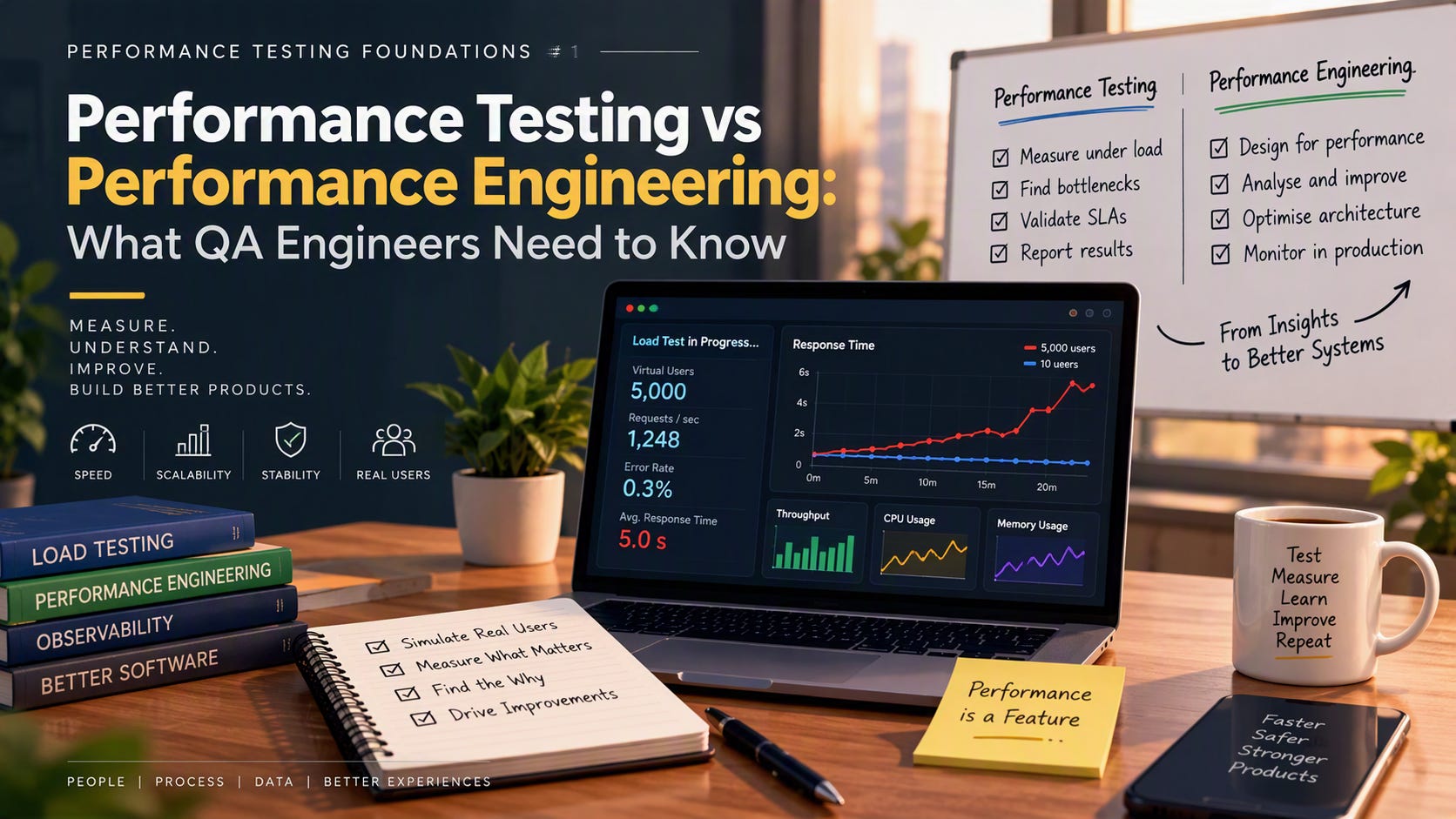
An API responds in 200 milliseconds with 10 users.
With 5,000 users, it takes five seconds.
The performance report turns red. Someone suggests adding more servers. Someone else blames the database.
But neither conclusion follows from those two numbers.
You have observed a slowdown. You have not explained it.
That distinction is a useful starting point for understanding performance testing and performance engineering.
1. What is performance testing?
Performance testing evaluates how an application behaves under a defined workload. It examines speed, stability, scalability and error behavior as demand changes.
The important phrase is under a defined workload.
“The API is fast” is incomplete.
“The API met our response-time and error targets while handling this transaction mix, at this traffic level, in this environment” is something a team can evaluate.
Different test types answer different questions:
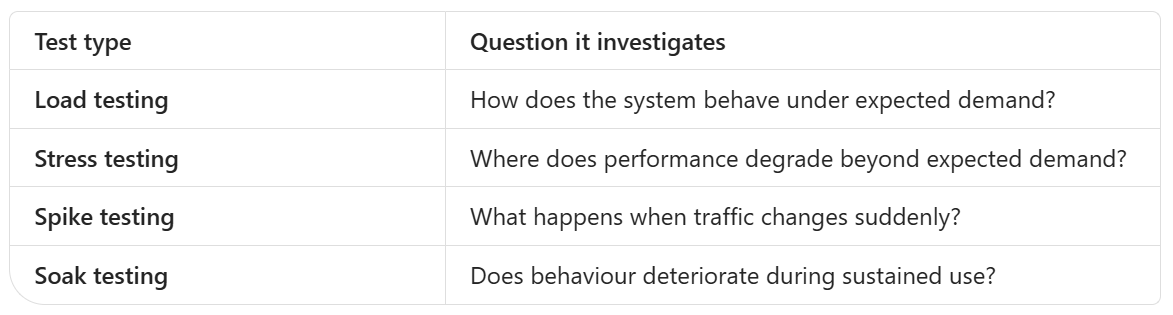
These are different investigations, not interchangeable names for running a large number of users.
My recommendation: Start with the question you need answered. Choose the test type afterwards.
2. Functional correctness is necessary, but not enough
Imagine a checkout API that creates the correct order and calculates the correct total.
Now imagine the customer waiting several seconds without knowing whether the order succeeded.
The result can be correct while the experience misses your performance expectations.
Functional checks establish whether the expected behaviour occurred. Performance testing adds workload, timing, throughput and error measurements. Those correctness checks should remain in the performance test: load-testing tools can evaluate response assertions alongside performance metrics.
For a checkout test, I would want to ask:
Was the correct order created?
Did the transaction meet its timing target?
How many transactions completed successfully?
What happened to failures as demand increased?
A fast error response is not a successful business transaction.
3. What is performance engineering?
Performance engineering is the broader discipline of considering performance throughout the software lifecycle. It includes architecture and design decisions, profiling, optimisation, infrastructure sizing, capacity planning and production feedback. Performance testing supplies evidence within that discipline.
A practical distinction:
Performance testing asks:
“How does this system behave under these conditions?”
Performance engineering asks:
“How should we design, investigate and improve the system so that it meets its performance goals?”
Testing measures behavior. Engineering connects those measurements to decisions.
But avoid a misleading shortcut: testing is not necessarily late, and engineering is not necessarily someone else’s job.
Performance tests can run throughout development and become a continuous signal in a delivery pipeline rather than a one-time pre-release gate.
My preferred mental model is:
Performance testing is part of performance engineering, not its competitor.
4. Understand the metrics before interpreting the result
Three terms appear in almost every performance discussion. They describe different things.
Response time: how long did it take?
Response-time measurements describe request duration. Tools commonly report averages and percentiles such as p50, p95 and p99.
My reporting recommendation: never write “response time was five seconds” without naming the statistic.
Was that:
An average?
A p95?
A maximum?
One observed request?
Those are not equivalent statements.
Throughput: how much traffic or work?
Throughput describes a rate. In an HTTP load test, a tool may report request counts and requests per second.
Be explicit about what you counted.
Requests generated and successful orders completed are different measures. Request metrics need correctness and error checks alongside them to establish whether the intended operation succeeded.
Concurrency: how many users are active together?
Concurrent users represent users active during overlapping periods. Their activity generates the traffic your system must handle.
A virtual user executes a workload. The duration of that workload affects how many iterations the virtual user completes. Consequently, user count alone does not establish request rate.
“We tested with 5,000 users” tells you the population. It does not describe the workload.
5. Your load model can change the meaning of the test
This is an easy detail to miss.
In a closed workload model, a virtual user starts its next iteration after finishing the previous one. When responses slow down, iterations take longer and the arrival rate of new iterations can fall.
In an open workload model, iteration arrivals are scheduled independently of completion time. This reduces the influence of system response time on the offered workload.
Neither model is automatically correct for every situation.
My recommendation:
Use a user-based model when your question concerns a defined population performing journeys.
Consider an arrival-rate model when your question concerns a specified rate of incoming work.
Document which model you used before interpreting throughput.
Otherwise, a slowing system may also cause your test to send less work, complicating the conclusion you draw from the results.
6. Scenario: 200 ms with 10 users, five seconds with 5,000
Let’s return to the original example.
The measurements establish a difference in observed response time under two user populations. They do not identify the bottleneck.
Here is the investigation approach I recommend.
First, make the comparison meaningful
Before diagnosing the application, check:
Same build and configuration?
Same environment capacity?
Same transaction mix?
Same test data characteristics?
Same response-time statistic?
Comparable cache and warm-up conditions?
Same workload model?
If several conditions changed together, treat the comparison cautiously.
Next, look beyond response time
Compare traffic, errors and request duration together. Each provides a different perspective on the system’s performance.
I would ask:
Did throughput continue increasing?
Did failures or timeouts increase?
Did only one endpoint become slow?
Did the slowdown appear suddenly or gradually?
Did performance recover after reducing load?
These are investigation questions, not diagnoses.
Then, locate where the time went
My suggested evidence checklist includes:
Application traces and timings
Database query and wait information
CPU and memory metrics
Connection-pool and queue measurements
Downstream-service timings
Load-generator health
Resource saturation, connection waits, database contention and downstream delays are hypotheses to test. Do not turn them into conclusions because they sound familiar.
Finally, validate the proposed change
I recommend changing one suspected constraint at a time where practical, then rerunning a comparable workload.
A useful outcome is not merely:
“The new run is faster.”
It is:
“Under comparable conditions, the measured delay decreased after this change, while correctness and error targets remained satisfied.”
That is a stronger basis for an engineering decision.
7. Define “good” before running the test
A performance test needs success criteria. Performance budgets and service-level objectives provide a way to define expectations, while baseline comparisons help detect regressions.
Here is an illustrative requirement template, not a universal target:
For the order-creation transaction, under the agreed peak workload and transaction mix, p95 response time must remain below the agreed limit, errors must remain within the agreed budget, and order correctness checks must pass.
Notice what this avoids:
“The application should be fast.”
“It must support lots of users.”
“Anything below two seconds is acceptable.”
My recommendation is to agree on the transaction, workload, measurement boundary and acceptance criteria with stakeholders before execution.
A threshold without context is just a number.
8. What should a useful performance report contain?
I recommend a report that helps someone reproduce the test and make a decision.
Test context
Record the build, environment, configuration, workload model, transaction mix, duration and relevant data conditions.
Results
Include response-time statistics, generated traffic, errors and correctness results. These are complementary measurements, not substitutes for one another.
Findings
Separate three categories:
Observed: what the measurements show.
Suspected: possible explanations.
Verified: explanations supported by investigation.
Decision and next step
State which agreed criteria were met, which were missed and what remains unknown.
My suggested closing format:
Finding: The transaction missed its agreed p95 target under the peak workload.
Evidence: Test results and correlated system measurements are attached.
Uncertainty: The cause has not yet been isolated.
Next step: Investigate the suspected constraint and rerun a comparable test.
That is more useful than attaching a dashboard and writing “performance failed.”
9. Where QA engineers fit
You do not need to personally optimize every query or redesign every service.
My recommendation is to build strength in four areas:
Workload modelling: describe what users actually do.
Measurement: understand what each metric includes and excludes.
Investigation: distinguish observations from hypotheses.
Communication: explain the risk, evidence and uncertainty clearly.
Performance engineering spans design, implementation, infrastructure and production feedback, so the work is broader than a single testing activity.
For QA, the opportunity is to make the evidence trustworthy and the unanswered questions visible.
The takeaway
Performance testing tells you how the system behaved under specified conditions.
Performance engineering uses testing, design analysis, profiling and operational feedback to improve and sustain that behavior.
The difference is not “running a tool” versus “using a more advanced tool.”
It is the difference between recording a result and building an evidence-based explanation.
A slow response is a finding. A bottleneck is a diagnosis. A validated improvement is an engineering outcome.
When your next load test turns red, ask: do we know what happened, or do we also know why?
Performance Testing Foundations #1
Share this article
Found this useful? Share it with another QA engineer.
Keep learning