The Hidden Maintenance Cost of Test Automation | Automation Foundations # 3
3 November 2026
It’s Monday morning. You open the CI dashboard and see 47 failed tests.
The release is on Friday. Your manager asks the question every QA engineer dreads:
“Are these real bugs?”
You don’t know yet. Nobody does.
So you start digging. Three failures are a real defect. Eleven come from a button whose ID changed in last week’s UI refresh. Nine come from expired test data. Six are timeouts because the staging database was slow overnight. The other eighteen? They fail sometimes, pass on a rerun, and nobody has figured out why in four months.
By Wednesday afternoon, you’ve spent two and a half days investigating 47 failures to find 3 bugs.
This doesn’t show up on any automation ROI slide. Nobody presents it at the quarterly review, and nobody budgets for it.
But in most teams, this is where automation time actually goes.
Automation Is a Subscription, Not a Purchase
When a team decides to automate a test, the conversation usually sounds like this:
“It takes 2 days to automate. It saves 30 minutes every regression cycle. Easy win.”
That math assumes something that’s almost never true: that the test, once written, will keep working on its own.
It won’t.
An automated test is code, and code that depends on a changing product breaks. The UI changes, APIs gain fields, data expires, environments drift, browsers update, and libraries get deprecated.
So the real cost of a test looks like this:
Total cost = Build cost + (Maintenance cost × Lifetime of the test)
The build cost is paid once. The maintenance cost keeps coming every sprint for as long as the test exists.
Many experienced automation engineers will tell you the same uncomfortable truth: over the lifetime of a suite, maintenance often costs more than development ever did. It’s spread so thinly across sprints that nobody notices the total.
Where the Maintenance Bill Actually Hides
Maintenance isn’t one big cost. It’s many small ones, and they’re easy to miss because each one looks minor on its own.
1. Locator churn
A developer renames a CSS class. A designer moves a button into a dropdown. A frontend team migrates components to a new library.
None of these are bugs, but every one of them can break a dozen UI tests.
If your locators depend on fragile things like auto-generated classes, deep XPath chains, or text that marketing changes every quarter, you’ve signed up for constant repair work.
2. Test data rot
The test user’s password expires. The coupon code from 2024 is no longer valid. The product used in the checkout test went out of stock. Someone else’s test deleted the record yours depended on.
Test data is one of the most underestimated sources of failure in automation. Tests that create their own data survive. Tests that borrow shared data slowly die.
3. Environment drift
The test passes locally, fails in CI, and passes again in staging.
Different configs, different feature flags, different service versions, different data. The test didn’t change, but the ground underneath it did.
4. Flakiness
Flaky tests are the most expensive tests you own, because each failure costs you twice:
Once when someone investigates it
Again when people start ignoring failures because “it’s probably just flaky”
The second cost is worse. We’ll get to that.
5. Framework and dependency upgrades
Selenium version bumps. Playwright API changes. A new Node or Java version. A reporting plugin that’s no longer maintained.
Every upgrade has a migration cost. Skip upgrades long enough and you end up with a framework nobody wants to touch.
6. Orphaned tests
The engineer who wrote the payment tests left the team eight months ago. Nobody fully understands what those tests check or why one of them waits 12 seconds before clicking.
So when they break, people either spend hours reverse-engineering them or quietly disable them.
7. Execution and infrastructure cost
A suite that takes 4 hours to run isn’t free. It costs CI minutes, cloud browsers, parallel agents, and, more importantly, feedback time. Developers waiting half a day to find out if their change broke something will stop waiting.
Let’s Put a Number on It
Here’s a simple, hypothetical example. Plug in your own team’s numbers.
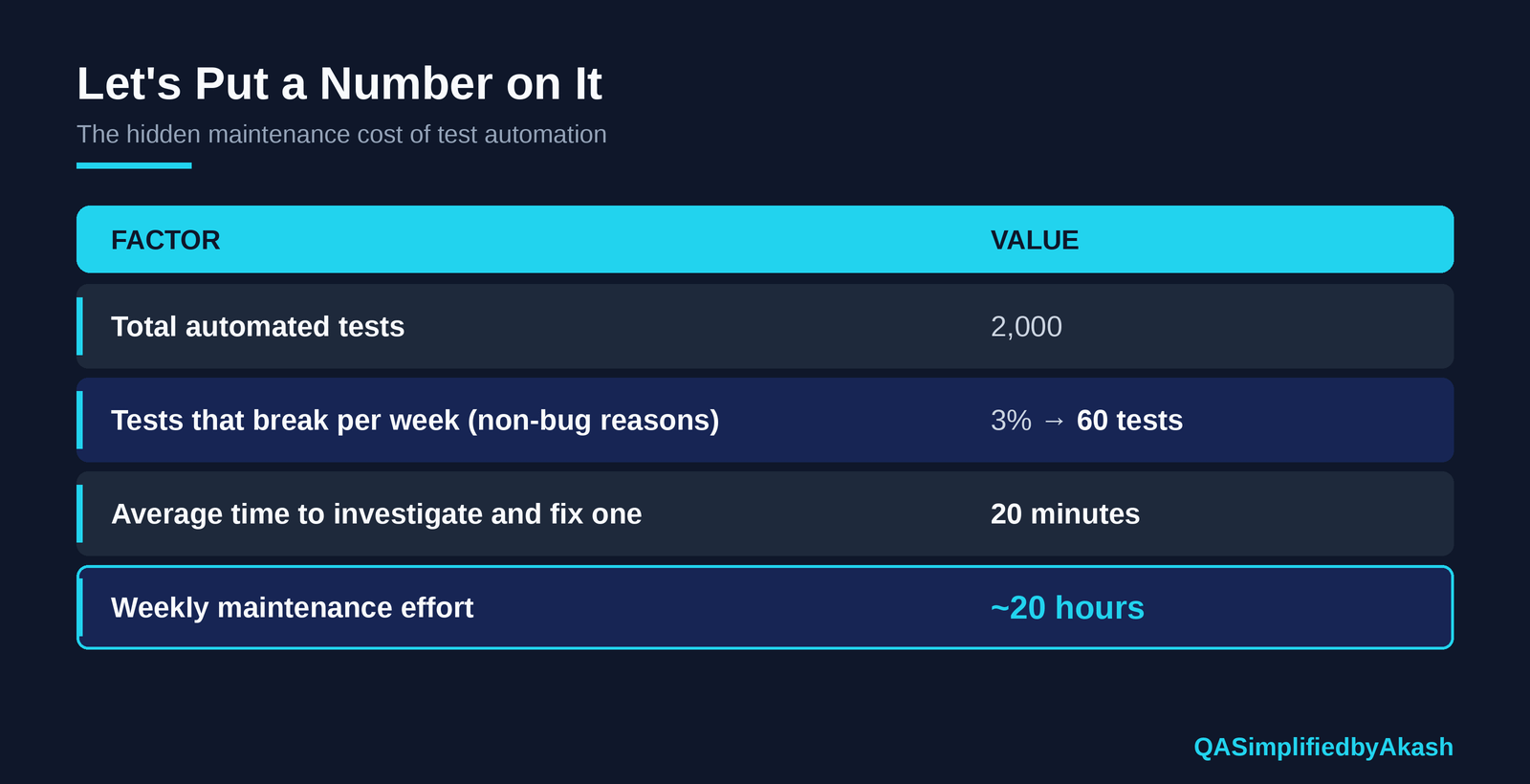
Twenty hours a week. That’s half an engineer’s time doing nothing but keeping existing tests green.
And that’s a fairly healthy suite. Push the break rate to 5% and the triage time to 30 minutes, and you’re spending most of an engineer’s week just maintaining tests.
Now ask yourself: does anyone on your team have “maintain existing tests” as half their job description?
Usually not. So the work either piles up in someone’s evenings or doesn’t get done at all.
The Most Expensive Cost Doesn’t Show Up in Hours
The hours are painful, but there’s a bigger cost: people stop trusting the suite.
It usually happens slowly:
The suite has a few flaky tests.
People start hitting “rerun” before investigating.
Red builds become normal.
Someone says, “Just merge it, those tests always fail.”
A real bug fails a real test, and nobody looks.
At that point you’re still paying the full cost of running and maintaining automation, but you’re getting almost none of the value. The suite has turned into background noise.
This is the trap. A test suite that nobody trusts is worse than a smaller suite that everyone trusts, because it costs more and gives people a false sense of safety.
Why Maintenance Grows Faster Than Your Suite
Here’s what catches teams off guard: maintenance doesn’t grow in a straight line.
When you have 100 tests, a login page change breaks a few of them. When you have 3,000 tests and 2,400 of them log in through the UI, the same change breaks almost everything.
Shared dependencies multiply the damage:
Shared login flows
Shared test data
Shared page objects with poor design
Shared environment setup
Each new test adds another thing that can break the next time a shared piece changes. That’s why teams often feel automation was “working great” at 500 tests and becomes “a nightmare” at 5,000.
The suite didn’t get worse at 5,000 tests. The maintenance cost that was always there just got big enough to see.
How Good Teams Keep the Bill Under Control
You can’t make maintenance zero, but you can stop it from taking over the team. Here’s what mature teams do differently.
Push tests down the pyramid
If a UI test only validates business logic, like a discount calculation, it shouldn’t be a UI test. Move it to the API or unit layer, where it runs faster, breaks less, and fails for clearer reasons.
Keep UI tests for what only the UI can prove: that a real user can complete a real journey.
Make locators boring
Agree with developers on stable test attributes like data-testid. Stable, boring locators are what you want, because they almost never change.
Abstract what changes
Use page objects, screen components, or API clients so a UI change gets fixed in one place, not in 200 test files.
Create your own test data
Set up data through APIs or database seeding before the test, and clean it up after. Tests that own their data don’t break when someone else’s test runs first.
Quarantine flaky tests and set a deadline
Move flaky tests out of the blocking pipeline right away. Then give them a deadline: fixed within two weeks, or deleted. A quarantine list that never shrinks is just slower deletion.
Assign ownership
Every test or test area should have an owner, whether that’s a team or a feature squad. Tests with no owner don’t get fixed when they break.
Delete tests deliberately
Remove tests that cover dead features, duplicate lower-level coverage, or have been flaky for months. A good suite gets pruned, not just added to.
Track the Metrics That Show the Real Cost
If you only track test count and pass rate, you’ll never see the maintenance problem until it’s too late. Add these:
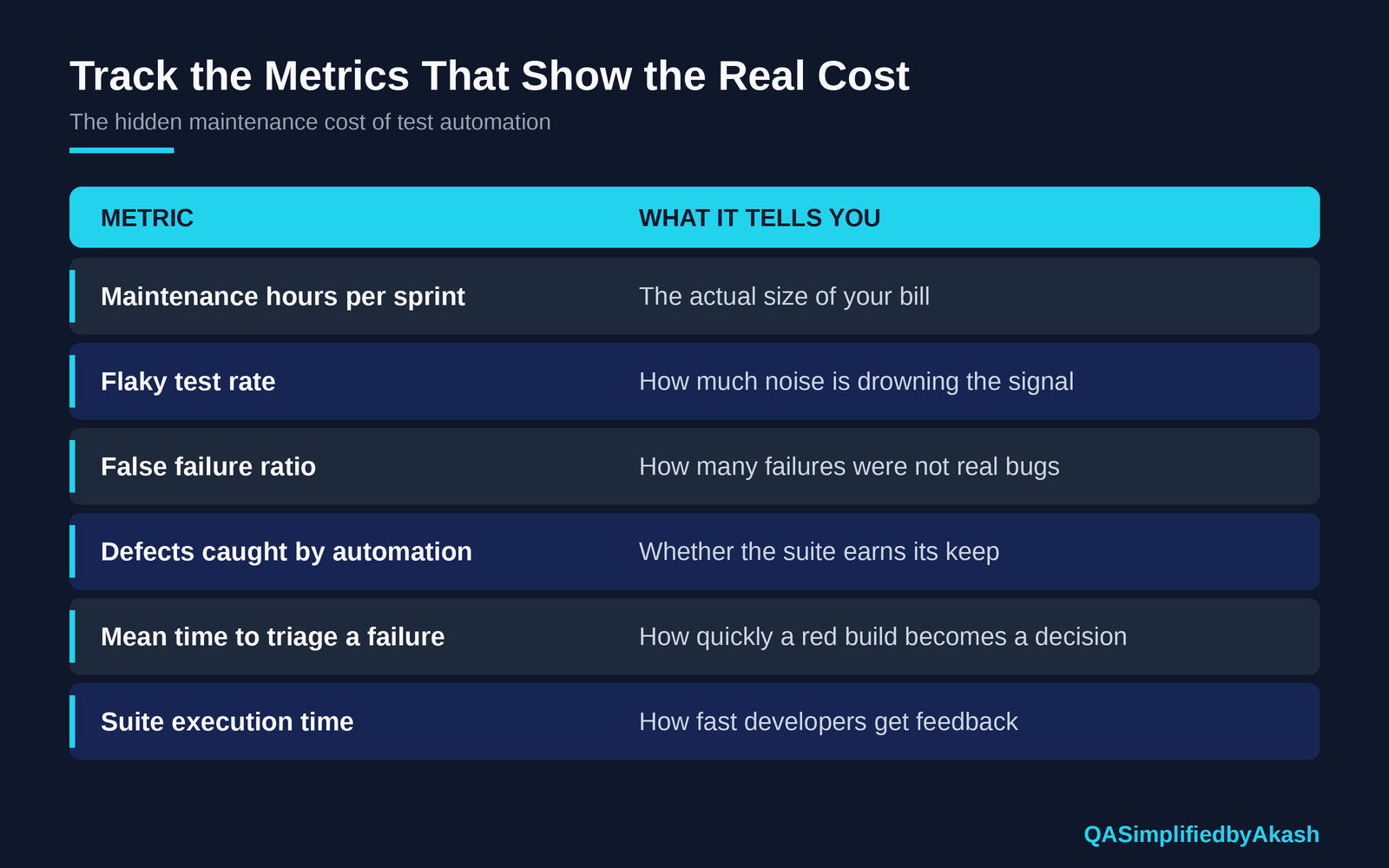
If maintenance hours rise faster than defects caught, your automation is getting more expensive while delivering less, and you should fix that before adding more tests.
Five Questions to Ask Before You Automate Anything
Before the next test gets written, ask:
How often will this break for reasons that aren’t bugs?
Can this be tested at a lower layer instead?
Who will own it six months from now?
Does it depend on shared data or a fragile environment?
Is the risk it protects worth the maintenance it will cost?
If the answers are uncomfortable, that’s useful information. Either redesign the test or don’t write it yet.
The Bottom Line
Automation is still worth it. When it’s done well, it lets teams ship faster, safer, and with more confidence than manual testing ever could.
But it was never free. Every test you write is a small commitment you make to your future team.
The teams that succeed with automation aren’t the ones with the most tests. They’re the ones who understood early that building the suite is a project, but maintaining it is a permanent job, and they planned for that from day one.
So next time someone celebrates hitting 5,000 automated tests, ask:
“Great. And what does it cost us every week to keep them alive?”
The answer to that question tells you more about your automation than the test count does.
Interview Corner: Questions You Should Be Ready For
1. What are the main contributors to test automation maintenance cost? Locator changes, test data issues, environment drift, flaky tests, framework upgrades, poor abstraction, and unclear ownership.
2. How would you reduce maintenance effort in a large UI automation suite? Move logic checks to the API or unit level, use stable test IDs, abstract UI interactions with page objects, create isolated test data through APIs, quarantine flaky tests, and prune tests regularly.
3. Your suite has a 20% failure rate, but most failures aren’t real bugs. What do you do? Classify the failures by root cause (data, environment, locator, timing, real defect), fix the biggest category first, quarantine flaky tests out of the blocking pipeline, and start tracking the false failure ratio.
4. How do you justify the cost of automation maintenance to management? Show maintenance hours next to defects caught, release cycle time, and the cost of escaped defects. Present automation as an investment with ongoing costs, not a one-time purchase.
5. When is a test not worth automating? When it breaks often for non-bug reasons, protects low-risk behavior, depends on unstable data or environments, or costs more to maintain than the risk it covers.
If this matched what you’ve seen on your team, share it with the person who maintains your test suite. They probably need to hear that someone noticed.
Share this article
Found this useful? Share it with another QA engineer.
Keep learning